




Publishers are gradually moving away from a monolithic system and switching to flexible CMS platforms.
Headless CMS platforms have been designed to meet the market requirements of the publishing industry. The headless CMS software market is estimated to grow from USD 1,193.9 million in 2026 to USD 9,159.4 million by 2036. 57% of users have reported enhanced personalization and user experience, while 41% have witnessed a significant increase in ROI after adopting hybrid CMS platforms. Though these offer omnichannel scalability, agility and faster deployment, not every company is comfortable with a decoupled stack. Organizations with stakeholder groups prefer an adaptable framework with lower operational complexity and better editorial controls. This created a consistent demand for hybrid headless setups.
Organizations are experimenting with hybrid headless CMS architectures that work as the perfect middle ground, offering both traditional content management and API-driven delivery without compromising editorial control. However, hybrid eco-systems often offer the perfect balance of personalization and flexibility along with centralized control, but come with certain trade-offs such as integration complexity and advanced deployment needs.
This is where CoreMedia enters the narrative. Designed as an enterprise CMS and DXP platform, it aims to make the large-scale content operations and workflow management of editorial and marketing teams seamless for enterprise brands. In this analysis, we will take a closer look at the features, strengths and limitations of CoreMedia and evaluate whether it addresses the challenges and meets the expectations of modern publishers without introducing technical overhead.
What is CoreMedia Experience Platform
CoreMedia positions itself as a full-scale digital experience platform specially designed for multi-site, multi-client, multi-channel and multi-language environments and operational scalability.
From omnichannel delivery, content management, personalized user experience, role-based permissions, hybrid CMS capabilities, and API-first flexibility, CoreMedia comes with features that cater to the requirements of enterprise-level organizations responsible for handling complex editorial workflows. While the feature-set plays a pivotal role when it comes to choosing the right platform for enterprise brands, the real differentiator lies in how these capabilities work together in a cohesive way and reduce fragmentation.
The centralized ecosystem of the platform allows content management, workflows, personalization, or publishing to be managed from this all-in-one ecosystem. Through traditional CMS capabilities and API-driven integrations, the same content can be published across a wide range of touchpoints such as customer portals, apps, websites, digital signage, and social media channels. This flexibility and future-ready approach is suitable for large-scale organizations with complex publishing requirements. But the flexibility demands strong coordination among team members across departments.
Some of the other features include DXP capabilities, such as audience segmentation and personalization which help brands come up with relevant content that appeals to their target audience. On the other hand, AI copilots and playbooks also support content recommendation, content creation, and workflows.
CoreMedia has been trusted by top-tier brands such as Max Mara, Emerson, Hoka, The North Face, ABC Australian Broadcasting Corporation, MTV Oy, Penguin Random House, Funke Medien Gruppe, among others. The broad feature stack offers a competitive edge to organizations looking to transcend the scope of basic content management. However, it might not be aligned with organizations with simple operational needs.
Features of CoreMedia Experience Platform
1. Hybrid Headless Framework
With CoreMedia, brands don’t have to stick to either headless or traditional CMS platforms. Through the same interface, organizations can explore conventional web experiences, server-side rendering, along with API-driven content delivery and GraphQL. There are preview options for editorial teams without technical expertise. At the same time, the teams can deliver the same content to a wide variety of platforms, including websites, apps, e-commerce channels, or other portals through API integration. This flexibility allows enterprises to gradually adapt to modernization strategies while using the existing systems, instead of restructuring the digital ecosystem.
2. Omnichannel Content Publishing
This removes the operational complexity for organizations responsible for managing a high volume of content across multiple platforms. Instead of putting in duplication efforts for each channel, the same content can be used for multiple channels from the centralized infrastructure. The strong integration with email marketing tools, social channels, and e-commerce stack removes friction from the publication workflow, while helping brands to maintain consistency. At the same time, the deployment and campaign execution process becomes faster.
This feature stood out to one of the clients, Jaakko Inkinen, MTV
He said, “Our journalists have so much content to create, they can’t be slowed down by publishing delays. With CoreMedia, they create and publish content at the speed and frequency they need.”
3. Modular Content Ecosystem
The modular structure allows every element of the webpage, such as headline, banner, images, and product descriptions to be reused, assembled, and even personalized for other platforms. In case one of the elements is changed or updated, the changes are reflected throughout all the platforms featuring the same content. Teams can also personalize modules based on the customer journey, audience requirements, or location.
4. AI Support
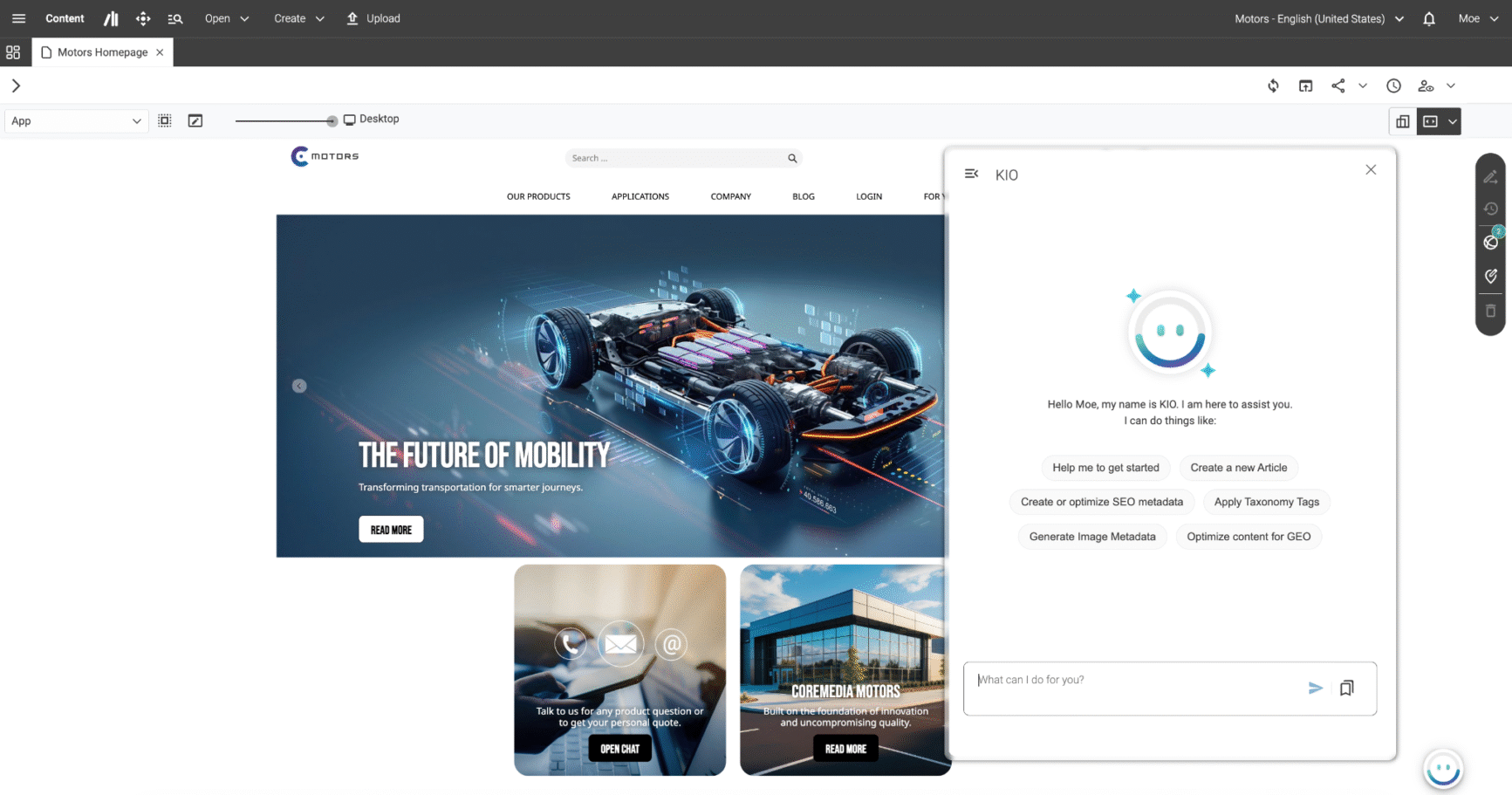
CoreMedia has an integrated co-pilot known as CoreMedia KIO, which supports editors with a wide range of time-consuming tasks, such as content creation, rephrasing, optimization for search engines, translation, metadata, image tagging, and rehashing content for audience needs, without taking the editorial control and oversight away.
Users don’t have to switch fields to perform various tasks. Using the conversational interface on the platform, editors can describe their objectives to the co-pilot in natural language, who helps them complete all the tasks with precision, such as content creation, SEO or tagging images. To maintain accuracy and ensure brand ethos, it is important to keep editorial oversight. Editors can offer their valuable feedback directly through the chat-style interface and offer the final approval before publishing.
The AI assistant also helps teams with tasks such as personalization, experimentation, and performance analytics, helping them take care of the digital experiences from the same conversational interface. In case of repetitive tasks that require more time and demand consistency, users can simply save custom AI playbooks and use them later.
5. Editorial Governance
While managing huge volumes of content, collaboration plays an important role. The strong integrated editorial workflows and role-based permissions of CoreMedia help enterprise-level organizations manage high-volume content operations. Without technical expertise, multiple departments can work in sync, edit, manage, personalize and publish assets from the platform’s own editorial workspace, CoreMedia Studio.
The workflows can be created according to the specific requirements of the organization. There are well-defined responsibilities for each team member and strong approval chains.
Within the studio, editors can use drag-and-drop components and preview how the content will be displayed across various devices before publishing. From scheduling publishing, updating your content across every channel, personalizing content, or archiving irrelevant content, the content lifecycle management capability streamlines processes and drives efficiency. Besides, the platform also supports localization and translation workflows, which help publishing teams scale global reach.
6. Advanced Personalization and Experimentation
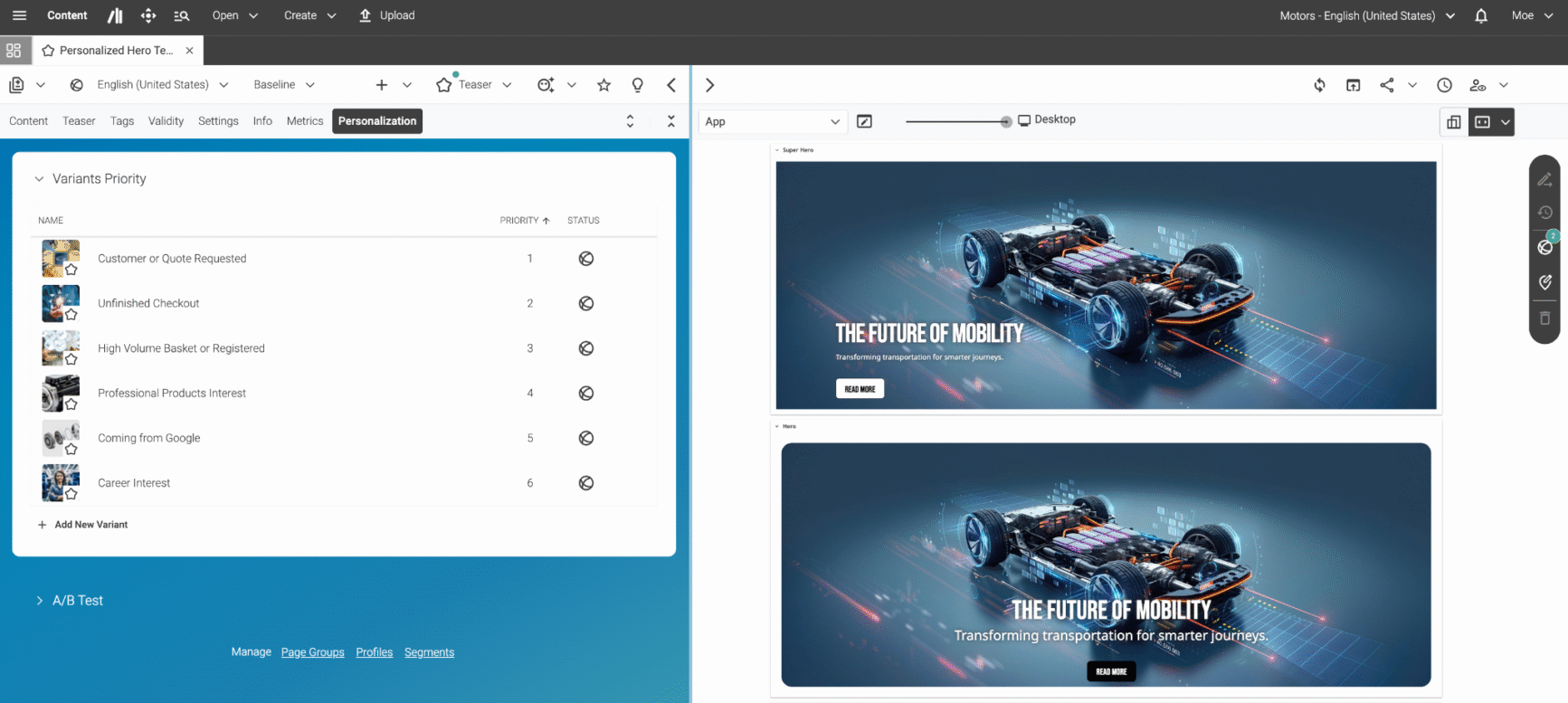
The advanced personalization and audience segmentation capabilities of CoreMedia make sure the content meets the modern user requirements based on their intent, geographical location, behavorial patterns, journeys, and preferences. AI-powered personalization tools help with advanced segmentation, analyzing live behaviour, content and product recommendations, and tailoring experiences for the audience across channels. Without coding, brands can continuously refine headlines, content variations, banners, page layouts, and other elements of the user experience through A/B testing. This performance-driven strategic approach helps teams make informed decisions based on data instead of operating on the basis of guesswork.
7. Digital asset management (DAM)
Not just content, every kind of digital asset, including videos, PDFs, documents and other media files can be organized and managed by teams within the CMS instead with the help of strong DAM integrations. Through tags, categories, or permissions, teams can access the assets from the centralized repository. The centralized updating feature reduces manual efforts for uploading or updating for various kinds of channels. Teams can also leverage response delivery or media optimization features.
8. API-Centric Integration
CoreMedia is designed to be an API-first platform that helps enterprises with robust digital infrastructure manage cross-departmental work in a flexible mannner. Through APIs and GraphQL, it can sync with CDP, analytical systems, CRM, e-commerce, or automation platforms, helping brands with a 360-degree view of the operations. It also saves the valuable time of teams, prevents data silos, and helps brands with cohesive digital experiences. In order to capitalize this feature, brands must have an advanced digital tack stack to maintain workflows in connected eco-systems.
9. Enterprise-level Governance and Security
When it comes to enterprise-level brands, compliance standards or performance cannot be compromised. Keeping this in mind, CoreMedia has a powerful AWS cloud infrastructure, along with CDN integration and the highest GDPR and ISO compliance standards (CoreMedia is ISO/IEC 27001:2022 certified), which ensure scalability, security control and reliable operations. Beyond AWS cloud infrastructure, CoreMedia supports other hyperscalers, on-premises, private cloud, European hosting, and hybrid deployment models, giving enterprise organizations the control they need over their infrastructure and data residency requirements.
From handing traffic spikes, ensuring fast loading times, and high performance standards, CoreMedia supports large-enterprise environments responsible for global content operations.
It is also worth noting that CoreMedia KIO offers the same deployment flexibility. Organizations can choose their preferred LLM to integrate with, including OpenAI, Azure OpenAI, Anthropic, or their own model. It can be deployed cloud agnostically, including on-premises, for full data privacy control.
Account Set up and Onboarding
Unlike other lightweight CMS platforms, the onboarding process of CoreMedia is not designed to be self-guided. The structure is primarily focused on the requirements of large-scale business operations. The onboarding process is not restricted to making an account. The process involves configuring workflows, managing role-based permissions, and setting up content structures. Editors will need the assistance of admins, developers, technical teams, and integration specialists for the complete set-up. This level of implementation-heavy set-up reflects the enterprise-level positioning but often makes the process elaborate. Though the process offers both flexibility and control, it certainly offers a steep learning curve to teams with limited resources.
Though users receive support through guided sessions, manuals and documentation for generating content, defining publishing workflows, or uploading assets, the process might seem rigorous for teams looking for a plug plug-and-play setup and a faster deployment.
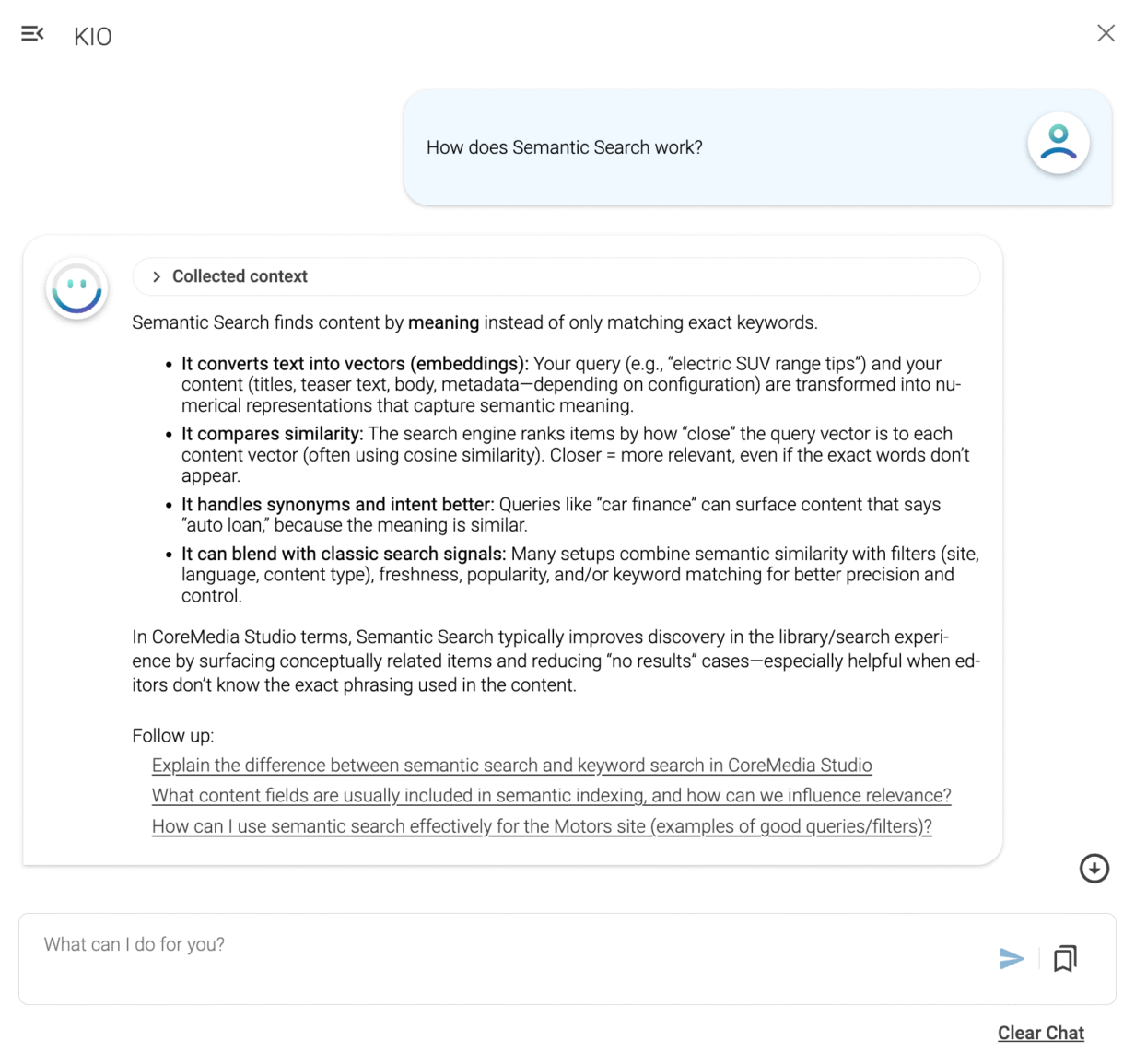
But CoreMedia KIO helps users navigate through the process. Instead of reading manuals, they can simply use the conversational interface to ask the common questions, such as “how do I set up a localization workflow?” or “how do I import an image from my DAM?” directly in the platform. The AI assistant answers the questions, clarifies the issues, and helps the users perform the tasks with minimum disruption.
Logging in and Authenticating
- To set up the account, the admin has to provide you with a login URL.
- There are various ways to log in. Based on the authentication method aligned with your security needs, you can log in through username, password, SSO, Azure AD integration, or Okta integration.
- Click on the sign-in option. After the authentication, you can access the CoreMedia studio dashboard.
Adding new users and Managing Access and Permissions
- On the studio dashboard, you will find the administration option on the navigation panel on the left side.
- From here, admins can perform a wide variety of functions, including adding/editing users, assigning roles, giving access and role-based permissions.
- On the User Manager interface, you can click on Create User or the + New User option.
- The next step would be entering your username, full name, password and even Single Sign-On, if applicable.
- Save the changes.
- On the user profile, you can find the options of Roles, Permissions, and Groups.
- You can get permissions and access according to the responsibilities of teams, such as creating content, editing, and publishing, and even create role-based workflows from here.
- You can also configure groups from here.
- Click on Save Changes to complete the process.
Setting up content architecture and workflows
- The content structure can be configured according to the specific requirements of organizations.
- This is essentially done by admins and the development team.
- Through the Blueprint framework, teams can configure the content type, including anything from landing pages, blogs, articles, or banners.
- Users can also tailor the the approval chain system, metadata and tagging.
- The workflows, such as drafting, review, approval, and publishing can also be configured.
Connecting the Frontend with Content Delivery
- If you want to use CoreMedia both as a headless and digital experience platform and deliver the same content across multiple channels, you can connect the frontend, such as websites, apps, or e-commerce platforms to the delivery environment.
- This connection is done through APIs, React apps or preview configuration depending on the ecosystem of the brand.
- CoreMedia also features live preview and visual editing, which helps teams to check how the content will be displayed to the users on desktops, tablets, mobiles or other headless units.
Migrating content and digital assets to the platform
- If you already have a traditional CMS and aim to migrate the content, articles, images, videos and other assets to CoreMedia, you can do it through import tools.
- External DAM systems must be connected before starting the synchronization workflows.
Tailoring the editor workspace
- After onboarding, editors don’t have to follow a defined structure and can personalize the workspace according to their preferences and requirements.
- From the user menu of the dashboard, editors can personalize preferred language, layouts, notifications, bookmarks and more.
- This ensures editorial speed and efficiency and offers them the freedom to operate according to their vision and goals.
Getting started with the dashboard of CoreMedia
CoreMedia Studio is the browser-based dashboard in the CoreMedia Content Cloud account. Built for admins, content creators and marketers, this editorial interface is the central hub for the entire activity pipeline, including drafting, editing, organization, approval and publishing. This approach helps you avoid switching to multiple external tools by combining core functionality like content management, workflow management, analytics, and SEO all in one place.
Beyond the features, it is important to align the workspace with the operational needs, user roles, and workflows. Once you log in, you can have access to these features.
1. Omni-channel Dashboard with Time-travel Previews
The omni-channel preview system of the dashboards allows editors to preview how their content will appear across different platforms, including websites, phones and tablets, apps, digital signage and even JSON/headless renders. Without the need for a separate review environment for different platforms, users can switch between these previews seamlessly within the dashboard.
Validating layouts and maintaining design consistency over time becomes even easier thanks to the “time-travel” style previews, allowing editors to preview and validate scheduled content before it goes live. Here, teams can preview the visual appearance of pages, banners, and campaigns scheduled to appear in the future, or after scheduled publishing actions are triggered. Simulating future publishing conditions allows editors to quickly pinpoint configuration errors, missing assets and layout issues.
This approach can be effective for coordinated multi-channel publishing duties, product launches, regional promotions or holiday campaigns.
2. Content Editing and Layout Management
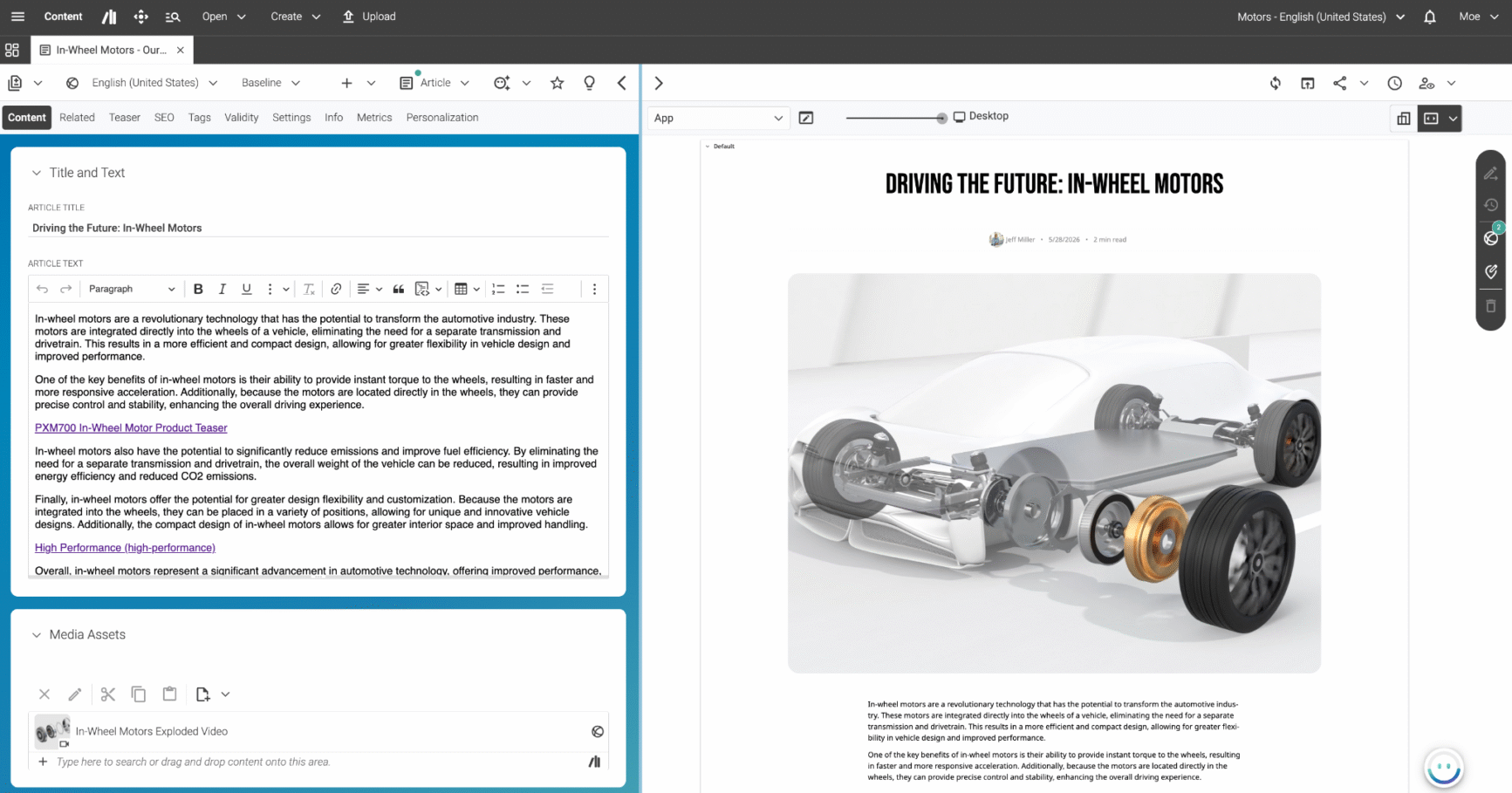
The dashboard features a WYSIWYG content editor with intuitive operation. This allows editors to quickly check content blocks and make rapid inline edits to page components, headlines and articles without having to open individual backend forms.
For advanced usability, the CoreMedia dashboard also features drag-and-drop functionality. Editors can change visual arrangements by dragging content blocks and layout elements. The CMS platform supports direct upload of a variety of file types, including word documents, media assets, videos and images.
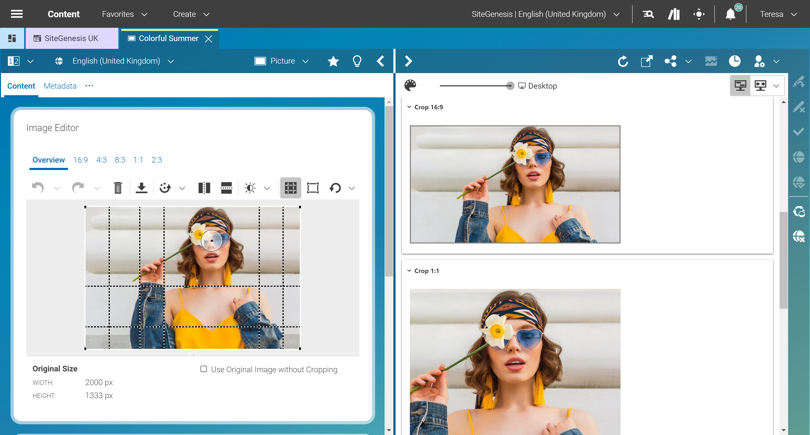
One of the customers, Marjori Blaske, Digital Marketing Manager at InSinkErator , pointed out how this feature drives efficiency saying, “ One of the features I really love is how you can upload a single image and have it automatically cropped for different screen sizes. It saves so much manual work, and we no longer need to rely on the design team for every adjustment — it just works.”
Editors can also create and manage pages using predefined layouts and preset content slots, making switching styles and formats easy in a no-code environment. Developer support is still a requirement for creating new templates or components, using the Blueprint framework.
3. Digital Asset Management
The integrated digital asset management system aims at easing repetitive workflow tasks and organization. Here, users can organize a variety of files, including documents, images, videos and other media assets. The system supports automated transformation of assets into different file formats and conversion between different aspect ratios for varied use cases. One key feature is Semantic Search, which enables editors to search for content items based on meaning and context, rather than relying on exact keyword matching. For example, editors can search for “summer campaign images” to find relevant assets without having to guess specific keywords.
The platform also has other features, including the creation of multiple media renditions from a single repository, cropping and editing images, and easy reuse of assets across different campaigns.
4. Personalization
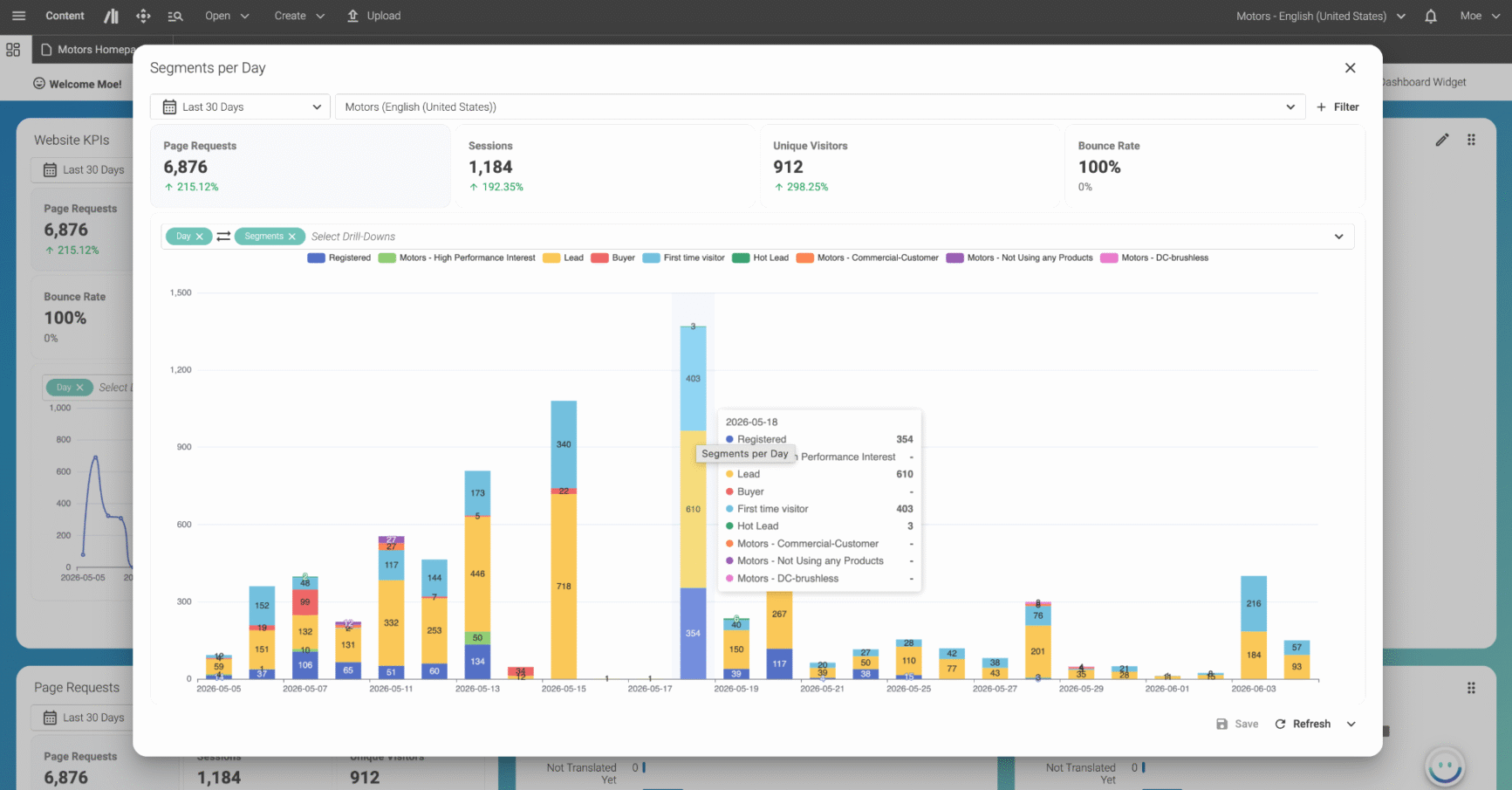
CoreMedia features a dedicated personalization dashboard with advanced features. It tracks audience behaviour and can dynamically adapt content based on preset parameters like customer actions, location, or engagement patterns. The system can also separate and organize audience segments using parameters like cart activity, click behaviour, or browsing intent. This effectively removes the need to involve developers in creating highly targeted customer experiences.
There is also support for persona simulation, where editors can simulate different customer personas and audience groups from within the CMS to see how content appears for different groups. Experiences can be previewed based on specific behaviours with segmentation like high-value customers, regions, or first-time users. According to the selected segments, the dashboard dynamically updates all previews to allow editors to validate personal journeys before they go live.
5. SEO, Analytics and AI Optimization
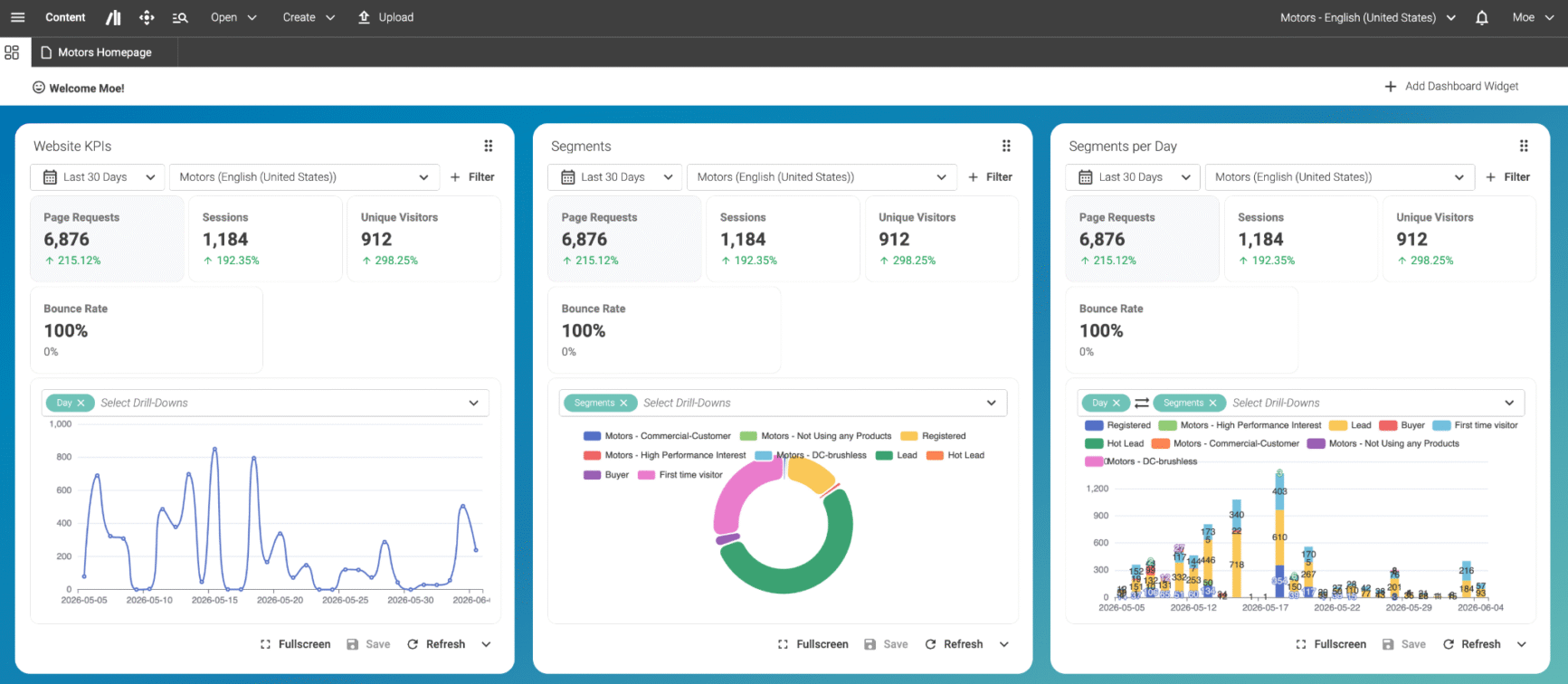
CoreMedia provides a fully functional analytics dashboard that helps editors track performance across different channels for experiences, campaigns and even individual pieces of content. Added features include A/B testing, facilitating content experiments to gauge performance.
The built-in SEO management tools can help with search visibility, providing a centralized location for configuring meta fields, URLs, sitemaps, and indexing rules. Incomplete fields generate alerts, ensuring optimization standards are enforced across the board.
Another important feature is the integrated AI copilot, CoreMedia KIO, that helps editors generate metadata, optimize, summarize, and rewrite content, and ease repetitive tasks.
6. Workflow Management and Operational Widgets
To ensure consistency, quality control and compliance before content goes live, CoreMedia includes a thorough workflow management system. Publishing workflows can be triggered directly, according to a schedule, or through approval-based workflows, while tasks are automatically assigned to specific managers based on user roles and permissions.
Organizations can create access levels with granular details, controlling access to actions and responsibilities like creating, editing, approving, and publishing. This helps maintain transparency and establish a chain of ownership for decisions. Localization also becomes simple with an integrated translation workflow.
CoreMedia’s dashboard widgets can be configured to display different data points. Users can opt to receive notifications based on scheduled tasks, assignments, approvals or publishing issues. Active jobs such as approval and translation requests, pending reviews, and scheduled releases can be displayed in the interface using widgets. Frequently used assets, campaigns and pages can be pinned using bookmarks and quick-access shortcuts. Status indicators and workflow alerts help track progress without requiring external project management tools.
7. Customization and Extensibility Options
Every element of the dashboard is customizable based on the requirements of different operations. In terms of advanced customization, almost every element in the UI, workflow setups, and interface behaviour can be modified through the use of specific extensions and plugins. To extend the system, developers can use API and custom integrations and marketplace add-ons, ensuring efficient and coordinated work for admins, marketers and regional publishers, utilizing tailored, customized interfaces suited to their unique needs and responsibilities.
Customization Features
1. Content Models
The content structure of banners must be fundamentally different from landing pages, product pages or articles. Publishers can use the CoreMedia Content Cloud to design the content structure on the basis of their operational needs. The platform allows the content architecture to be tailored to the needs of any industry, including media publishers, e-commerce brands, manufacturing brands, financial services, and marketing teams. The templates, content blocks, banners, CTA, and hero sections can be reused across channels while adding customized elements. Teams can add specific fields, metadata, and configure various operational workflows. This is especially useful if the brands are responsible for omni-channel operations, but strong governance is required.
2. Editorial Structure and Role-based Workflows
While editorial teams focus on content creation and publishing schedules, marketing teams might need campaign-based workflows. The editorial environment can be designed according to the roles and responsibilities of various team members, including admins, editorial teams, marketing teams, and localization teams. Every aspect of the editorial workspace, CoreMedia Studio, including widgets, navigation panels, interfaces, approval chains and translation workflows can be customized but administrative supervision is required to maintain accuracy.
3. Visual Experiences
Even if the editorial teams lack technical expertise, the visual experience can be configured without the intervention of the development team. With the help of drag-and-drop controls, editors can rearrange the design of campaigns, layouts, banners, and other components and keep experimenting.
4. Omnichannel Display Settings
Teams can even personalize how the content will be displayed in various channels such as websites, apps, e-commerce platforms and focus on channel-specific user experience. They can experiment with layouts and optimize according to the consumer mindset and intent. But coordination among teams is important to keep the overall experience aligned.
5. Customer segmentation and experiences
From banners, content experiences, or product recommendations, everything can be customized according to customer journeys. This helps publishing teams cut through the noise and deliver what customers need. To improve customer experiences, there are persona simulation and journey testing capabilities that enable teams to form a strong understanding of the personalized customer journey before the content is published and revise targeting strategies.
6. AI Workflow architecture
CoreMedia KIO, the native co-pilot of CoreMedia, assists teams with various tasks such as content creation, summarizing, SEO, or automation of workflows. The key differentiator is not just that third-party tools can be connected, but that organizations are not bound to a specific LLM. They can choose the LLM that powers CoreMedia KIO, including OpenAI, Azure OpenAI, Anthropic, or their own model, giving them full control over the AI infrastructure behind the platform.
Pricing
CoreMedia operates on a subscription-based model, with all terms formalized in an order form. Pricing is capacity- and consumption-driven rather than per-user seat, making it predictable and scalable for enterprise deployments.
The provisioned infrastructure and capacity are scaled to your actual traffic demands, alongside modular add-ons that extend the platform only where needed, from Commerce and Personalization to AI-powered content operations.
Storage, bandwidth, and additional environments are available as transparent, consumption-based options with no hidden fees. Before any commercial proposal is made, CoreMedia walks the organization through its specific requirements with a dedicated consulting team, ensuring you pay only for what you need with full confidence and no unexpected costs as you grow and scale.
Support
CoreMedia is implementation-heavy and is not designed to be a self-serve platform. However, the customer support team keeps the users covered throughout. There is a dedicated online help desk where all the issues faced by customers are addressed with care by experts. Since the onboarding process does not follow a plug-and-play model, guided consultations and admin manuals are provided for setting up the account, integration, deployment, migration of assets and more. Editorial training, developer and product guides are also provided if needed. Though users receive comprehensive support, but it is important for teams to translate the guided learning into their regular workflows and operations to make effective use of the platform.
In addition, the built-in AI-Copilot, CoreMedia KIO, empowers editors to ask questions about CoreMedia features and capabilities, for example, “How do I initiate a translation workflow?” CoreMedia KIO acts as an always-on expert colleague and is available instantly, around the clock, in any language.
In case of critical issues that need immediate attention, 24/7 support is available. You can also reach out to [email protected] with a detailed description of the challenge you are facing while navigating the platform. After receiving the mail, the support specialists will schedule a live call soon to provide you with the best solutions. Consumers can also go through the documentation link and the knowledge base to form a strong understanding of the platform and its functionalities.
CoreMedia Review
Here is what we loved about CoreMedia
- CoreMedia workflows are designed for large-scale enterprise organizations that want to manage multiple sites or channels.
- The hybrid headless infrastructure strikes the perfect balance between flexibility and consistency. Without a major overhaul of the digital ecosystem, teams can still work with advanced frontend structures while still delivering content through the centralized system.
- The editorial governance ensures quality control and accuracy without making users feel restricted.
- The omnichannel preview helps brands build consistency across devices and helps with optimization-focused decisions.
- From workspace layouts, content panels and preview setups to platform extensibility and visibility settings, everything can be customized on the basis of editorial needs and goals.
- The co-pilot, CoreMedia KIO, streamlines a wide range of publishing workflows within the editorial eco-system and saves manual effort.
- The strong customer support team provides comprehensive guidance to the users.
Areas of improvement
- The set-up might seem too implementation-heavy for small publishing teams. It is intentionally designed to meet the needs of enterprise organizations managing complex content operations, multilingual scale, and critical data infrastructure.
- Just like other enterprise CMS vendors, the pricing structure relies entirely on custom, quote-based pricing, making it difficult for teams to analyze long-term costs without consultation. However, CoreMedia’s customized approach based on actual business requirements avoids unexpected costs in the long run.
- Though the customization features are comprehensive, the process might involve a high level of dependency on technical teams.
- CoreMedia operates both as a CMS and DXP, but the wide range of features might seem too extensive for teams with straightforward publishing requirements.
- It is not the ideal platform for teams looking for rapid deployment. If your operations are more complex than site management and if you have dedicated tech support, the migration can be completed in 6 weeks.
Final Thoughts
With a hybrid headless architecture, enterprise-level governance, omnichannel delivery, Co-Pilot integration and advanced customization options, CoreMedia is a compelling proposition for enterprise-level organizations that want to transcend the scope of website management or publishing and want to focus on complete digital experiences. The platform stands out for operational breadth, personalization capabilities, and cross-functional agility, but brands need technical maturity to leverage the platform.
Though the learning curve might seem steep for small teams in the case of implementation and customization, CoreMedia offers tested blueprints, out-of-the-box integrations, and dedicated implementation support. CoreMedia can drive significant impact to the future-ready brands which want the perfect combination of centralized control and long-term scalability. To sum it up, success with CoreMedia does not just depend on its feature availability, but on how well it aligns with the brand’s workflows, operational infrastructure and priorities.