




More than 72% of publishers use centralized ad serving systems to manage campaigns across various platforms. Modern-day publishers are looking to strike the perfect balance between control and operational flexibility. The publishing operation is not restricted to ad delivery or maximizing fill rates anymore. From inventory management and performance analytics to managing team workflows, and targeting, publishers have to navigate through a wide range of responsibilities, often scattered across multiple tools.
Naturally, as the need for operational discipline increases, publishers are looking for a unified platform that consolidates all the functions and makes ad operations seamless, while offering more options for effective customization.
This is where the Epom Ad Server comes into play. Serving as the single source of truth, Epom Ad Server brings multiple monetization workflows such as inventory management, ad serving, analytics, workflow automation and other aspects in a single ecosystem. Though platforms like this help with operational fragmentation and offer more control, they often come with certain limitations, such as complexity and a steeper learning curve for teams with limited technical resources.
In this review, we will essentially focus on the features of this ad delivery network, its reporting depth, customization features, and try to analyze whether it is a suitable platform for centralizing monetization worкflows for publishers without introducing any additional layer of complexity.
What is Epom Ad Server?
In 2025, the cloud segment constituted 71.8% of the total ad server market. Designed as a systematic need, Epom is a cloud-based ad server which is not just designed for publishers, but also for advertisers, networks and agencies. It is not restricted to being an ad delivery platform. It has a cross-functional approach that does not just help publishers with organizing ad inventory, executing campaigns, frequency capping, pricing or targeting, but also brings analytics, API integrations and even white-label deployments for enterprise-level organizations all within one workspace.
From display ads and video ads to native ads and rich media, Epom Ad Server supports a multitude of ad formats that strengthen the monetization opportunities for publishers. Unlike traditional monetization tools for publishers, it serves as a comprehensive ad operations tool.
The broad set of features makes Epom suitable for enterprise-level organizations that don’t just want plug-and-play solutions, but want to strike the perfect balance between operational discipline and customization flexibility, while maintaining advertiser relationships. Epom Ad Server has been trusted by top publishers such as IGA, Turtlemint, Finanztrends, Wargaming.Net, among others.
Features of Epom Ad Server Platform
1. Inventory Management
The structured inventory management provides publishers with the flexibility to manage the assets in a seamless manner. Through a simple hierarchy that features Site → Zone → Placement, it helps publishers organize the ad inventory, work with diverse ad formats, manage placements, and keep track of performance. It offers more control in terms of monetization setups, even with the increasing complexity of operations. Though setting up the hierarchy might seem complex for small teams with limited technical overhead, this feature makes the workflows easier for publishers responsible for handling multiple campaigns at the same time.
2. Supports Multiple Ad Formats
With Epom, publishers don’t have to juggle between separate tools for managing various ad formats. Epom supports a wide range of ad formats, including banners, native ads, display ads and rich media campaigns and strengthens revenue opportunities for publishers. The customizable templates also add to the flexibility. Publishers can place the ads based on the audience behaviour and preferences. This helps them maximise fill rates while catering to evolving advertiser requirements. Among Epom’s customers, standard display ads are the most widely used format, though video and native ads are also being adopted.
3. Powerful Ad Serving and Campaign Management
Epom does not just help with ad delivery, but provides granular control over ad operations. From setting up ad placements, rules for ad delivery, campaign priority, frequency capping, and budgeting, everything can be streamlined from one interface. The advanced campaign management allows everything from frequency capping, manual weighing, banner display rules, to waterfalls and daisy chaining. Publishers can prioritize premium campaigns and set up the inventory accordingly, execute time-bound seasonal campaigns, ensure profitability through budgetary controls and also prevent user fatigue by making sure repetitive ads are not shown to the same user. The eCPM optimization enables publishers to maximize revenue potential from ad placements.
4. Advanced Custom Targeting
As the reliance on third-party cookies starts fading, the importance of first-party data has become more crucial than ever, especially when it comes to targeting. Though Epom allows GEO and device targeting, what truly stands out is the custom targeting options. Publishers can use first-party data to create segmented audience segments, thereby equipping advertisers with better targeting options. This helps them create high-value inventory, boost campaign performance and ensure improved CPM rates.
5. Analytics and Performance Reporting
Keeping in mind that publishers have various operational requirements and priorities, Epom features a highly customizable dashboard with more than 800 options. They can track ad performance based on various factors such as data, demographics, campaigns and ad placements, and use various filters to create reports to understand which ad formats are performing well, bringing them the highest revenue and spot underperforming segments. They can also get a well-rounded view of how some of the key metrics are having a strong impact on revenue, such as fill rates, clicks, ad requests, impressions, and eCPM.
Though it offers data-driven analysis, the only drawback is that the dashboard doesn’t update on a real-time basis. Publishers also must note that advanced analytics come with additional costs. From automating reporting, sharing performance reports with members, to creating custom dashboards by integrating with external business tools, publishers can enjoy more control in how they want to use their data.
6. Hybrid Monetization Streams
Epom supports an optional SSP module that allows publishers to manage various monetization workflows from the same interface. Instead of transitioning between platforms, they can just integrate DSP endpoints and run both programmatic demand and manage direct campaigns. This enhances revenue opportunities from various channels, boosts fill rates, and adds a layer of flexibility.
7. White Label and API Integration
Unlike traditional SaaS platforms, Epom Ad Server offers the flexibility of both white-label and API deployments. The hi-tech ad networks that want to offer a signature branded environment to consumers can stick to white-label deployments. Ad networks can also connect Epom with external systems and software, share performance data, create programmatic campaigns, and develop tailored workflows according to their operational requirements. This feature can be leveraged by companies with a specialized ad operations team.
Account Setup & Onboarding
The account setup and onboarding process is straightforward and is not exclusively designed for enterprise-level organizations. Though it cannot be termed as a pure plug-and-play process and needs structured coordination, it offers a low entry barrier for organizations without extensive ad tech expertise through guided implementation. However, for some functionalities, such as implementing ad tags and deploying for websites, technical assistance is imperative.
Self-serve users get hands-on support throughout the process, which includes dedicated account managers, direct support channels, tutorials and documentation.
1. Exploring the features
Before you sign up, it is important to explore the features of the platform, understand how it fits into your operational requirements. This can help you analyze the wide range of functionalities and make an informed decision. There are two ways to ensure this:
2. Getting platform access and creating the network
- During this process, you generally have to specify all the important information, such as name, business details, target audience, objectives, and budget.
- This helps the platform understand your requirements and customize the workflows accordingly.
- The team will go through the details and grant you platform access and login credentials.
- Based on the deployment type, you will get access to the tailored dashboard and become the primary admin.
- For white-label deployments, you need to give essential information elements such as logos, email templates, and integrations.
3. Setting up users and assigning team roles
- Based on your organizational structure, you have to assign roles and give permissions to the team members.
- To do this, go to the user management option from the admin panel and click on ‘add user’.
- Assign roles such as Admin / Publisher / Advertiser / Network, plus statistics-only accounts..
- Invite the team members and tailor permissions.
- Record payment and payout details.
4. Configuring publisher inventory
- This is the most important step to set up a hierarchical structure and make sure that the ads are delivered to the right audience.
- Go to the publisher tab and add the site.
- Select the zone where you want the ad to be placed.
- Then determine the placement of the ad.
5. Connecting traffic sources
There are several ways to monetize your inventory:
- In case you want a rapid setup or you are a mid-sized team lacking tech resources, you can use Epom’s integrated SSPs and exchanges. Your dedicated account manager will help you configure this.
- If you are an enterprise-level organization seeking granular control over traffic and bidding, you can add your own demand sources.
6. Choosing ad formats and defining delivery rules
- Now, choose the ad format. The list includes video ads, display ads, native ads, interstitial ads, and more. You can also experiment with various kinds of ad formats and placements.
- Decide which ads should be given priority and how often they should be shown to users to maintain user experience.
- Set up the optimization rules to reach out to the relevant audience, boost monetization opportunities and maximize fill rates.
7. Generating and pasting ad codes
- After the ad is placed on the zone, Epom generates an invocation code.
- Copy the JavaScript code and paste it on the website and page.
- After the ad is placed In the desired location, make sure you test it properly to make sure there are no issues with loading, placement of ad tags, or user experience.
8. Tracking and optimizing campaign performance
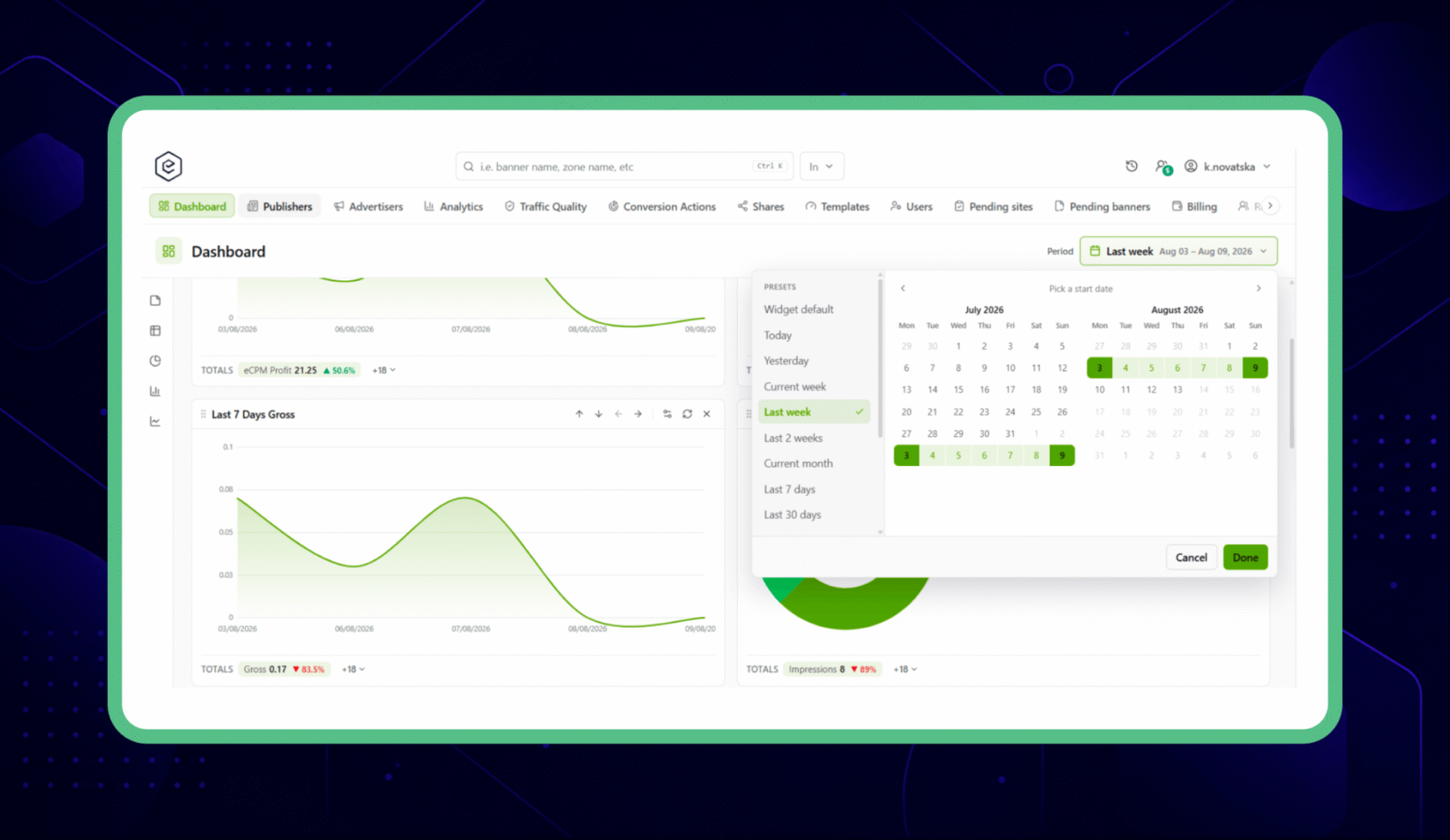
- After the campaigns are activated, it is time to monitor the performance and optimize effectively.
- The dashboard offers more than 40 key metrics.
- From clicks, impressions, and ROI, you can get a comprehensive view of the performance.
- Set up audience, location, device settings, targeting rules and create custom reports.
- In case certain ads are not performing as expected, you can refine bids and adjust placements to drive revenue growth.
Getting started with the dashboard of the Epom Ad Server
For optimum ease of use, it is crucial to understand the unique features of Epom’s dashboard, its workflows, inventory management system, advanced analytics, and pricing controls. The dashboard also supports 18 languages that appeal to global audience.
1. Customizable, Widget-Based Workspace
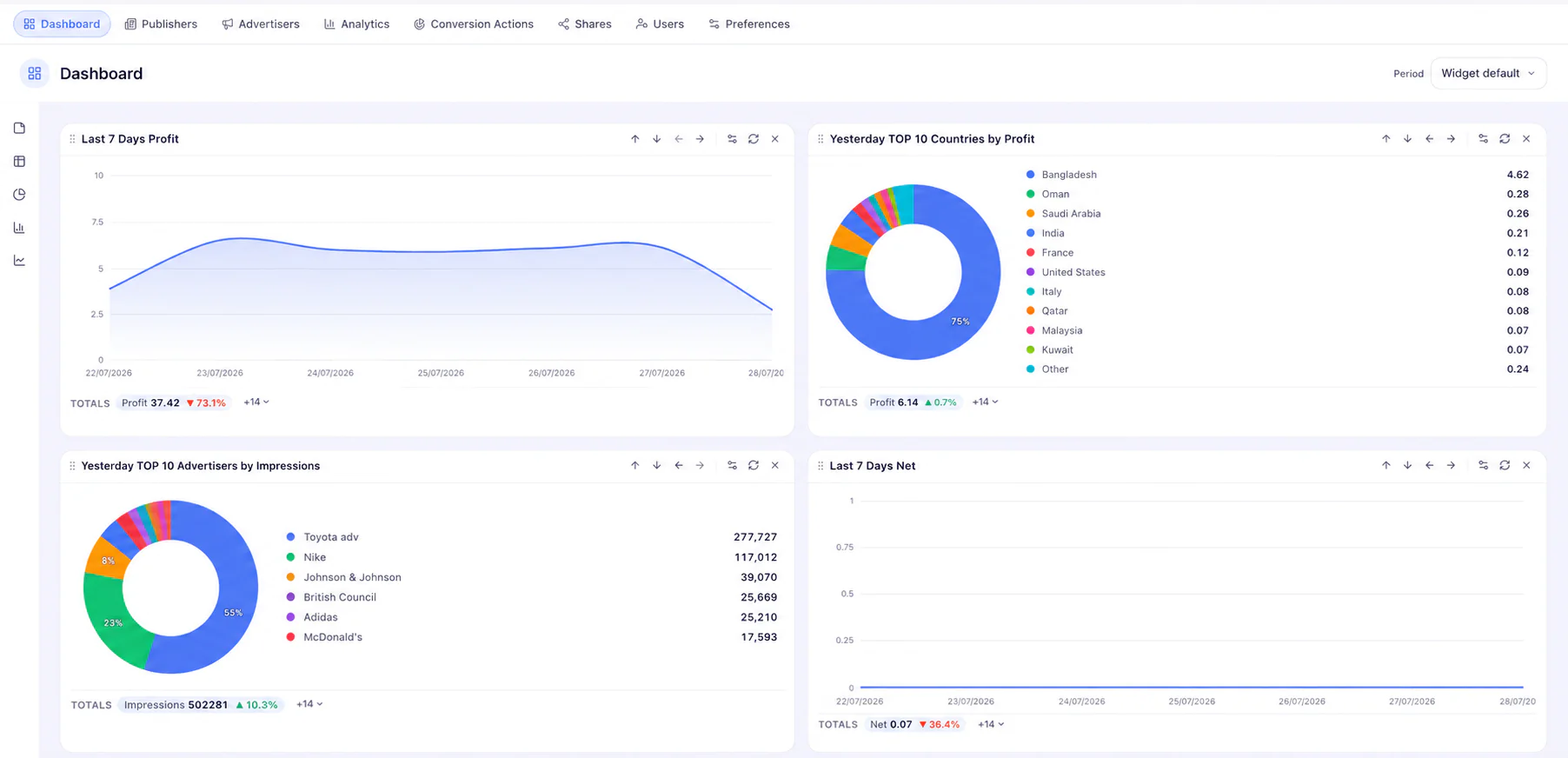
After logging into the Epom workspace, the first thing that catches the eye is the widget-based layout. There is no rigid, one-size-fits-all reporting structure here. Instead, Epom takes the radically opposite approach.
The analytics dashboard is extremely customizable, allowing users to focus on metrics that matter the most. Charts and components relevant to daily or weekly operations can be brought front and center. A revenue manager might want to focus on gross revenue, net profits and eCPM widgets in the dashboard, while an operations manager might want to focus on error logs and fill rates. The modular approach makes the analytics dashboard usable for multiple operations.
The tradeoff here is option paralysis. The high volume of structural settings and metrics can be overwhelming, and it is certainly not a plug-and-play interface. You need to spend time familiarising yourself with the system and making carefully considered decisions.
2. Dual-Workflow Navigation: Publishers and Advertisers
Out of the box, Epom provides separate interfaces for publishers and advertisers to cater to its diverse user base.
This dual-workflow structure creates an immediate hard, logical boundary between your inventory and active campaign operations, and can be effective for teams operating direct campaigns. However, this might seem overwhelming for publishers more used to a streamlined monetization platform with a singular focus.
This workflow really reinforces Epom as a complex multi-party campaign management system rather than a straightforward publisher tool.
3. Granular Inventory Management and Tag Generation
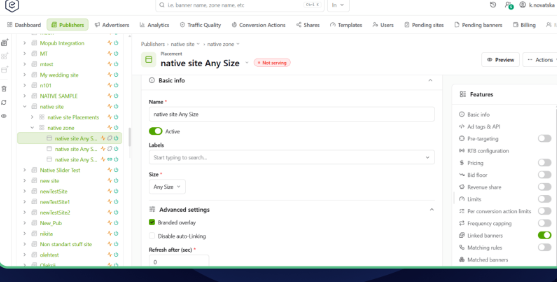
One strong suite for Epom’s dashboard is inventory management, for which it offers a highly structured, feature-rich workflow for categorizing and tagging digital real estate.
The system uses a Site -> Zone -> Placement hierarchy that publishers use to map their properties, where the site is the overall domain or application, the zone is a specific section on that site, and the placement denotes the exact ad unit location.
While this kind of strict framework does necessitate heavier initial setup than other, simpler platforms, the level of control offered is a big advantage. For publishers trying to manage multiple websites, subdomains, or a massive network of applications, this kind of hierarchy prevents confusion and chaos. It lends itself very well to scaling.
Once the inventory is properly structured, the interface can offer the option to generate tags. Users can generate tags based on their ad formats, including JavaScript tags, VMAP/VAST tags for video, and native response URLs without having to resort to a third-party tool. In spite of the initial complexity, this significantly reduces deployment friction and creates a highly integrated ad ops workflow.
4. Pricing Controls and Campaign Delivery Setup
Epom helps teams implement highly specific, customized monetization strategies from the dashboard.
Epom pricing models are dynamic. Users have the option of configuring multiple levels of Cost Per Action,, Cost Per Click, and Cost Per Mille models. There are also country-specific and regional adjustments. If a publisher is running direct deals across multiple global markets, it is easy to set up very granular pricing rules based on user location.
This works in tandem with extensive ad delivery controls, including scheduling, delivery weights, budget limits, priority tiers, and frequency capping.
The caveat here is the heavily manual nature of operations. With highly automated, AI-assisted platforms slowly taking over, this might not be a great choice for teams looking for ease of use. However, for absolute control and precision, especially with strict guarantees for direct-sold campaigns, Epom is hard to beat.
5. Targeting and Traffic Quality Management
Epom goes beyond basic ad delivery and really allows users to zero in on highly specific audience segments. The targeting engine of the dashboard has expected parameters like device and geographical targeting, but Epom also goes above and beyond with custom parameters, specialized rules for pricing, and delivery restrictions baked directly into campaign settings. For those looking to manage audience-specific direct deals based on custom parameters, this is a great system.
This is complemented by traffic risk scoring and security reports to prevent ad fraud. Traffic quality scoring is advisory rather than auto-blocking.
6. Reporting, Analytics, and Tracking Visibility
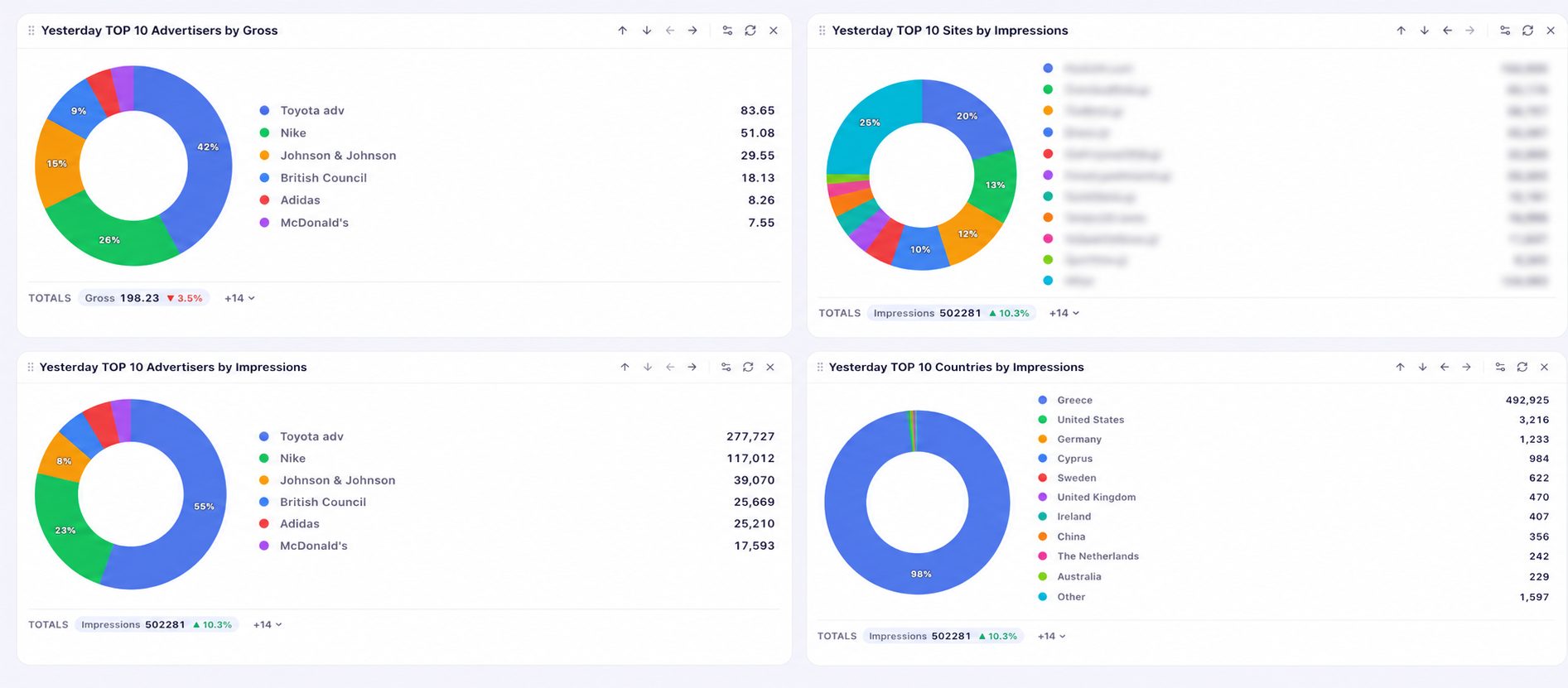
Epom excels when it comes to deep data reporting and analytics that aid in operational troubleshooting and informed decisions. The reporting filters of the dashboard have a high degree of granularity with metrics like country, placement type and size, banner, date range and many more. Publishers have access to hourly breakdowns to diagnose issues and identify underperforming inventory.
Epom provides an exhaustive range of data points, including gross revenue, net revenue, profit margin, fill rate, CTR, eCPM, clicks, requests and impressions, allowing the reporting layer to track profitability with ease. There are 40+ metrics and 10+ filters available that help users optimize effectively. While this might be daunting for smaller publishers, larger operations can find exactly the data they need for deeper analysis.
Advanced tracking capabilities like pixel tracking and S2S postbacks make the system particularly suited for complex attribution models and performance-driven campaigns.
The only issue here is that the dashboards are not always rendered in real time. The data delay might be insignificant during daily use, but if you are used to instant ad ops dashboards, this lag might be something to consider.
7. Permissions and Sub-Accounts
Epom dashboard scores more points when it comes to enterprise use cases due to its permissions and sub-account controls. Users can be approved for varying levels of access, either globally or on the basis of projects or roles. Admins can restrict specific permissions and even create analytics-only roles.
This helps provide optimum functionality to various clients, teams and external stakeholders without compromising security or system integrity. While such granular controls might not be a priority for smaller teams, large agencies and ad networks will come to appreciate the flexibility.
8. APIs, Automation, and White-Labeling
The USP of Epom is its configurable nature, making it feel more like an open framework and less like a closed SaaS product.
Essentially, Epom is an API-centric platform. It allows thorough integration with external systems and deep extension of all functions through API use. Publishers with engineering teams can, therefore, easily extend the functionality by building on this API feature and linking the platform with convenient external, even proprietary tools. Customers have already built and used this feature extensively, including creating API integrations to push hourly performance reports directly to messaging apps like Telegram.
While most teams will find the advanced analytics layer natively offered by Epom an adequate solution with plenty of features, users also have the option to further extend the system by exporting raw logs. The reports can then be scheduled and automatically delivered to be directly fed into an external Business Intelligence platform. This makes for an extremely powerful workflow, especially if you have your own data lakes.
Finally, organizations can completely white-label the frontend experience, ensuring branding consistency across all UIs and domains used in ad tags. This allows businesses to provide a completely bespoke, branded experience to clients while taking advantage of all of Epom’s great features in the background.
In August 2026, Epom rolled out A new UI system that easens the campaign setup.
Customization Features
Epom does not confine publishers to a strict one-size-fits-all approach. It has a wide range of customization options which provide significant control to publishers with complex requirements. From user roles, ad formats, placements, permissions, inventory, deployment, branding to reporting and delivery rules, everything can be customized according to the operational preferences and goals.
1. White-labeling support
This customization feature is essentially suitable for enterprise-grade companies that want to offer a consistent experience to customers and stick to their own brand identity. Instead of redirecting customers to a third-party tool, the platform can be configured according to one’s own brand assets, such as logos, colour schemes, and layouts, though the ad-serving technology will be designed and supported by Epom. The reporting environment and campaigns will reflect your branding instead of Epom’s. To the clients, it will seem that the platform is your native offering and create a strong sense of credibility. This will also save your investment in building your own ad technology and give you the flexibility to customize the experience for your clients.
This feature added value to one of the clients, Aditya Saraswat, Founder at GetLiveUpdate. He said, “We decided to white-label instead of investing money in development because it was completely risk-free. After trying Epom, we never regretted this decision — 800+ readily available features branded under our name are all we actually needed.”
2. User management, role-based permissions and access
This helps publishers create a tailored environment for the team members according to their responsibilities and roles. In case they are responsible for managing several websites, they have the liberty of creating sub-accounts for each. Besides, they can also give role-based permissions to various team members such as network manager, network supervisor, publisher and advertisers, so that they can work together while maintaining boundaries. They will only have access to the features they need.
For example, a Network Manager can control campaign management, while publishers can be responsible for supply-side serving. On the other hand, a dedicated ad operations team might have access to demand-side ad serving activity. This enables companies with a huge team to create well-defined workflows and helps them scale operations without friction.
3. Inventory Setup
With Epom, publishers don’t have to adhere to static frameworks. They can simply design the inventory according to their business objectives, traffic source, audience segments, location, or device. Be it the site, zone or placement, everything can be designed around various factors.
For example, a media publishing company might design the inventory by sections such as lifestyle and culture, hard news, and finance. On the other hand, global publishers might also design placements according to the demographics. An audience from Australia will be served campaigns that differ from the ones served to the audience from India. This makes both management and performance reporting simpler and more effective at the same time.
4. Ad formats and templates
Epom diversifies the monetization opportunities for publishers by supporting many kinds of ad formats, including native ads, video ads, standard banner ads, and more. This helps go beyond traditional advertising and appeal to a wide range of advertisers, while adating to their evolving demands. They can keep experimenting with various ad formats and find out which format resonates the most and drives the highest revenue.
In case you don’t want to invest in creating templates, you can also use the template library of the platform to make engaging creatives for formats like native ads, video units, or rich media.
This helps small teams with limited resources customize without extensive technical knowledge. There are various pre-coded options such as HTML5 templates, fixed-size templates, in-app banner templates, pop-up and native templates and more. However, in case you have high-end implementation requirements and have the resources, you can also use HTML creatives and third-party tags to customize further.
Mohan Chilukuri, Ad Operations Executive at YuppTV, a customer of Epom, found the customized template feature effective and described how it resulted in tangible results. He said, “We managed to increase the viewability of our streaming content by 231% during our partnership. With Epom templates, we quickly launch cross-channel video campaigns for our platform. The user experience of our ads is top-notch now.”
5. Audience Targeting
There are more than 20 targeting options available. This enables publishers to create campaigns that strike a chord with the audience, instead of serving generic ads to people of varied tastes. Like other ad-delivery platforms, it has standard location and device-based targeting. Besides, publishers can also add custom parameters using their own first-party data. This can result in highly specific campaigns for a niche audience tailored to their tastes. For example, the targeting engine helps them create separate campaigns for first-time users and registered subscribers. This helps them maximize revenue opportunities.
6. Analytics and Performance Reporting
Epom users don’t have to work with a rigid reporting ecosystem. They can create their own reports for various websites, customize them based on their relevant metrics and even schedule them automatically according to their own timelines. Enterprise-based organizations can also extract raw logs, integrate them into BI platforms and create detailed reports needed for advanced performance analysis.
For example, publishers might create separate ad performance reports to identify eCPM trends, while the ad operations manager can create reports based on click-through rates. This helps them organize data according to priorities and enhances collaboration among team members. The platform also significantly reduces the effort of making reports manually, filtering them and even distributing. The reports are automatically generated and sent to various team members.
Pricing
Unlike many enterprise platforms that have an ambiguous pricing structure, Epom has a simple, transparent structure that helps potential customers make an informed decision before signing up. There are 4 tiers, but all the plans come with the same features and functionality. However, the pricing is based on the impression volume.
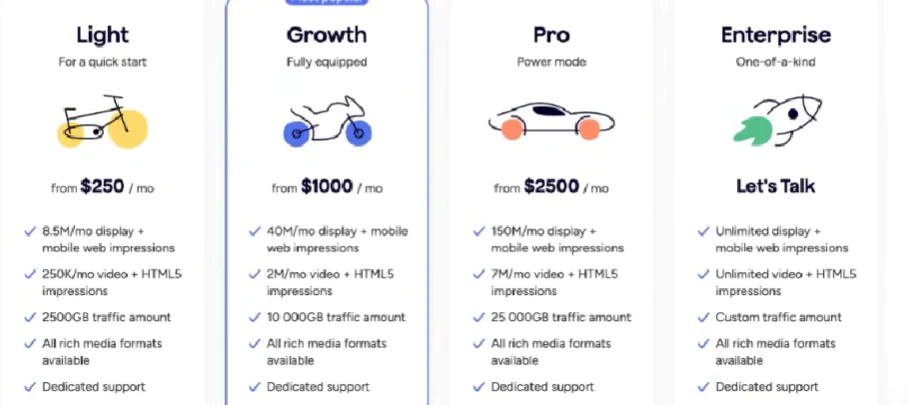
- The light tier starts at $250 per month for 8.5 million display and mobile impressions and 250,000 video impressions. This is designed for small publishers.
- The growth tier is known to be the most popular one and is priced at around $1000 per month. This is applicable for 40 million display impressions and 2 million video impressions.
- The pro tier is designed for well-established publishers responsible for large-scale operations. Priced at $2500 per month, this plan includes 150 million monthly display impressions and 7 million video impressions.
- The enterprise plans are for unlimited display and web impressions and custom traffic. The pricing is available after consultation with the sales expert.
Dedicated support and rich media formats apply to all tiers. However, there are other options such as white-label support, SSP module and premium support for custom development, which come at additional costs.
The pricing structure might not be feasible for budding publishers with low-volume traffic. It is the perfect model for established publishers who want greater ownership of the revenue stack.
Customer Support
Epom understands that new users face many challenges during the process of onboarding, integration and navigating the features. This is the reason the platform offers comprehensive support to users. Before signing up as customers, the 14-day trial or demo account helps users analyze all the functionalities of the platform. Though it is designed to be a self-serve platform, the onboarding process might seem complex for small publishers with limited coding knowledge.
During onboarding, each customer will be assigned a dedicated account manager who will be there to guide the users every step of the way, right from creating sites, adding banners, to setting up the ad inventory, and generating ad tags. In case you face any roadblocks, you can also reach out to the manager through direct channels such as Slack, WhatsApp, Telegram and Google Chat. The platform also has a dedicated help centre, API documentation, and knowledge base that will help new users get a strong overview of the feature-rich platform.
Here is what we loved about Epom Ad Server
- More than an ad delivery platform, Epom serves as a comprehensive ad operations platform that offers a centralized platform for campaign delivery, inventory management, analytics, and even targeting.
- The inventory management for publishers is well-organized, helping publishers handle multiple websites without friction.
- Epom supports a wide range of ad formats and deployment methods, broadening the scope of revenue.
- Beyond device and geo targeting, it helps publishers use their first-party data for custom targeting.
- The dashboard has more than 40 metrics and 10 filters, allowing advanced analysis of data.
- The onboarding support is comprehensive and helps new users navigate through major implementation challenges.
- The pricing tiers are designed in a way that all users have access to the same functionality. The pricing is based on traffic and not features, which makes scaling easy even for small publishers.
Areas of improvement
- Though it is designed to be a self-serve platform, placing ads, creating inventory, or configuring campaigns might offer a steep learning curve to small teams with limited experience in ad operations.
- The dashboard doesn’t update on a real-time basis, making the experience limited for publishers who want to monitor the results instantly.
- The breadth of features might be difficult for emerging publishers to grasp.
- The user interface can be simplified. The platform acknowledges this and plans to redesign it for an improved experience.
- The entry-level pricing might be too high for small publishers with low-density traffic.
- Some additional features, like the SSP module and advanced support, might introduce additional costs.
Final Thoughts
Modern ad operations involve many complex workflows, requiring a robust and flexible platform for efficient operation. Simple, lightweight tools are not adequate for agencies managing high-volume ad campaigns. This is where Epom comes in. The enterprise-grade infrastructure is perfect for those looking for advanced features, a wide range of monetization opportunities and high scalability. It can process millions of requests per second, making it a perfect choice for publishers looking for a strong, powerful platform. However, this also brings a degree of complexity to the workflow, which might not be suitable for publishers looking for a plug-and-play solution. The platform demands technical expertise to a certain extent, but the granular control over workflows, campaign delivery, and inventory management, combined with a highly configurable framework, makes it a compelling choice for mid-to-large publishers with broad audience reach.