




Even the best content, which has been meticulously crafted and painstakingly optimized, can begin to slip down the rankings over time. Most publishers lack the time and resources to constantly monitor old content, as there’s always new content to create.
Even if they do monitor their content, they can still struggle to diagnose the problem and fix it, unless they’re willing to invest in expensive, complex tools or seek help from an SEO agency. This is where Page Booster comes in.
Page Booster is a feature that comes bundled as a part of NicheIQ, Ezoic’s keyword research and topic suggestion tool. It identifies the pages on a website that are losing traffic and slipping down the search rankings, and suggests measures to boost that page’s performance.
NicheIQ claims to be the first keyword research tool built specifically for content websites and Page Booster is integral to how NicheIQ delivers on this promise of uniquely serving content websites better than other, generic, all-purpose keyword research tools.
We believe this makes Page Booster deserving of its own review, having previously reviewed NicheIQ. During our review we wrote about how we struggled to make Page Booster work, given that it only works for websites with relatively high traffic. As such, this time around we’ve used a demo site with enough traffic to test all of Page Booster’s features.
Getting Started With Page Booster
To start using Page Booster, publishers need to log in to their Ezoic account and select NicheIQ from the top navigation bar.

Make sure that Google Search Console (GSC) is authorized for the website on which Page Booster needs to be implemented. This can be done by selecting Settings from the left-hand side menu and clicking on the “Authorize This Domain” option on the main panel.
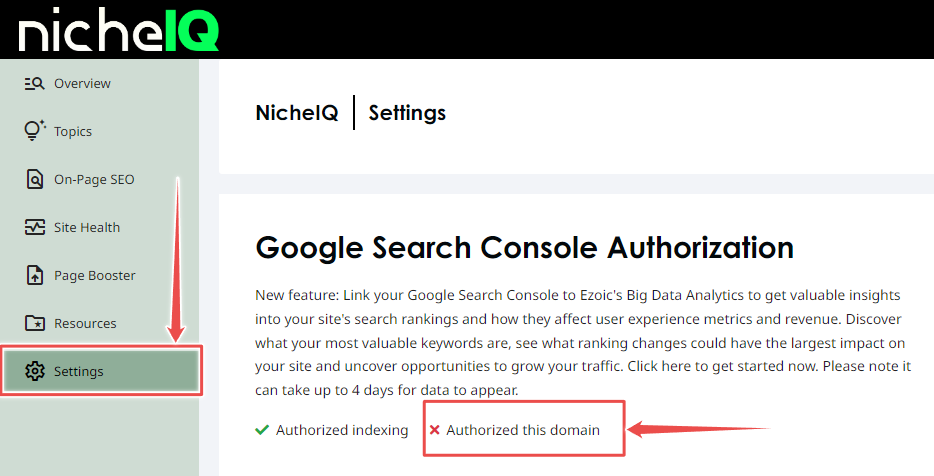
Once GSC has been authorized for the domain, a green tick shows up against the “Authorize This Domain” option.
Next Steps With Page Booster
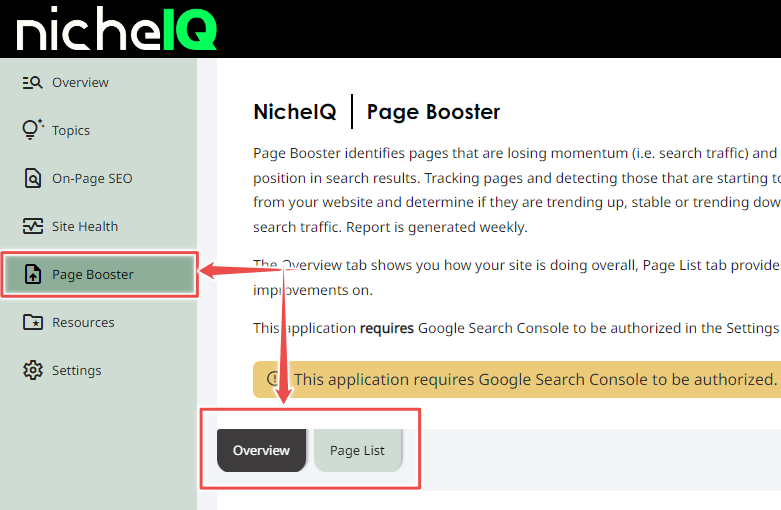
To launch Page Booster, click on the Page Booster tab in the left-hand side menu. This opens up the Page Booster home page with two functionalities displayed — Overview and Page List.
Overview
Overview offers a quick bird’s-eye view of a website’s performance, broken down into three metrics:
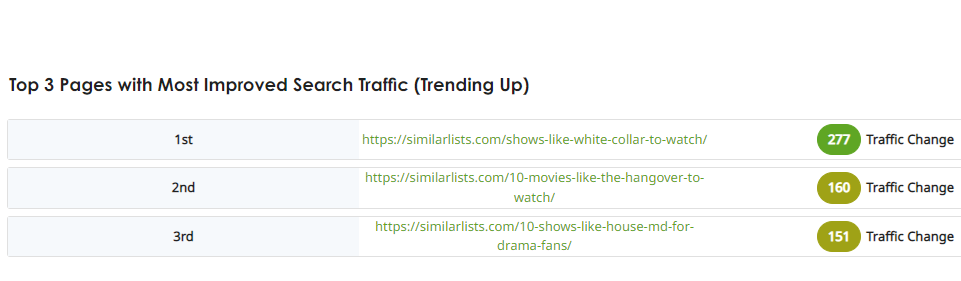
1. Top Three Pages
These are the three pages that have shown the most improvement in search traffic over the past month. The amount of traffic gained is highlighted in the third column on the right in different shades of green.
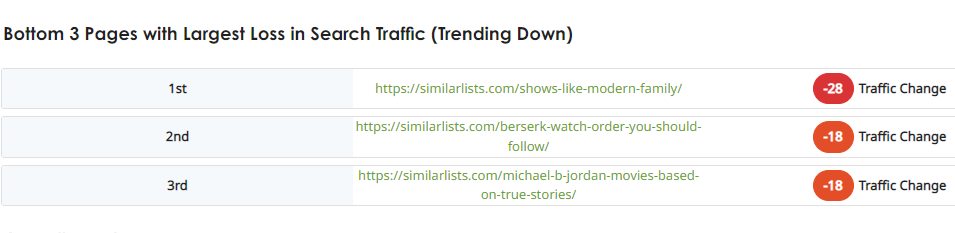
2. Bottom Three Pages
These are the three pages that have lost the most traffic over the last month. The amount of traffic lost is shown in the third column on the right in different shades of red.
3. Overall Trend
This is a breakdown of all the pages on a website that shows, with the help of a colored bar chart, how many pages have been gaining traffic, how many have been losing traffic and how many have remained stable over the last one month.
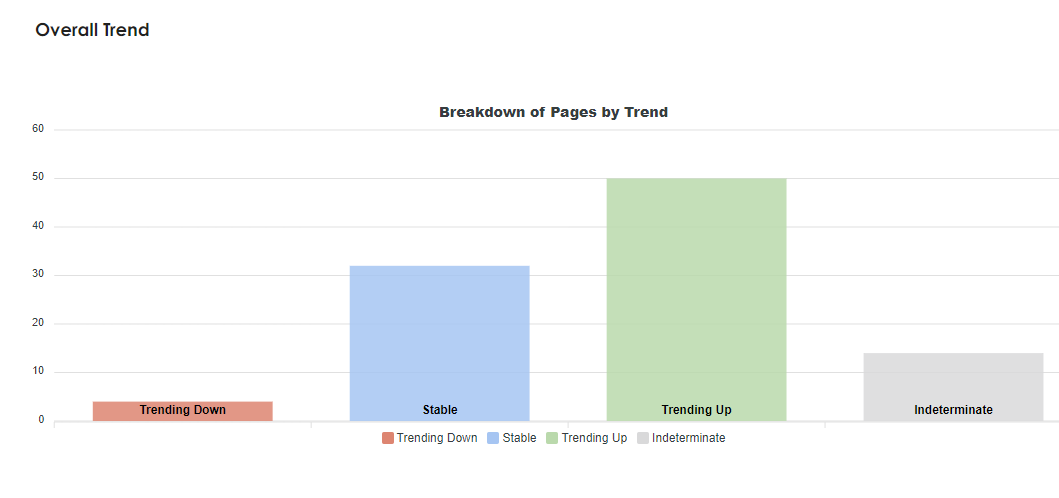
A fourth bar called “indeterminate” denotes the pages for which Page Booster could not gather sufficient data.
Page Booster can only analyze pages that received at least 100 visitors and ranked within the top 20 search results on average over the last four weeks. Also, for sites with more than 100 pages, it can only show the top 100 pages that gained/lost the most traffic over the last month. Any pages that do not fall within this range show in the “indeterminate” column.
This means there can be a relatively sizable selection of pages the tool sweeps into the indeterminate category, missing out on a chance for broader optimization efforts.
Page List
This section gives a more detailed breakdown of individual pages on a website. For each article URL, Page Booster provides four metrics — Search Position, Search Position Change, Organic Search Traffic and Traffic Change.
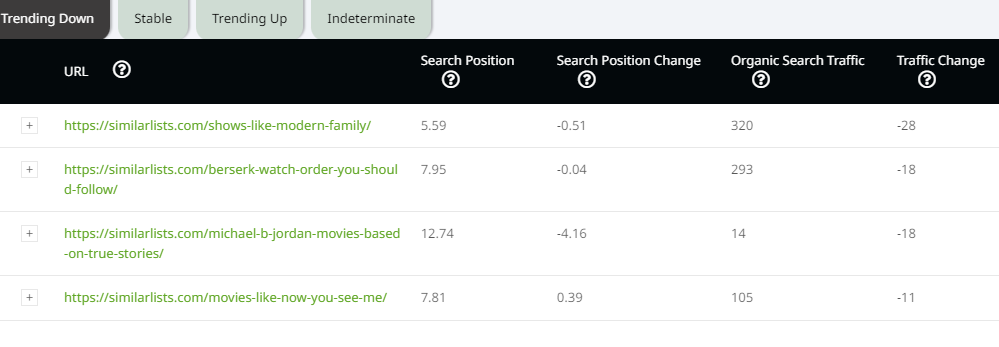
Publishers can use the tabs above the table to toggle between articles that are trending, up, down or are stable.
The leftmost column in each row has a “+” sign that shows a detailed keyword analysis for each article. This is where publishers gain actionable insights on how to boost their page’s performance.
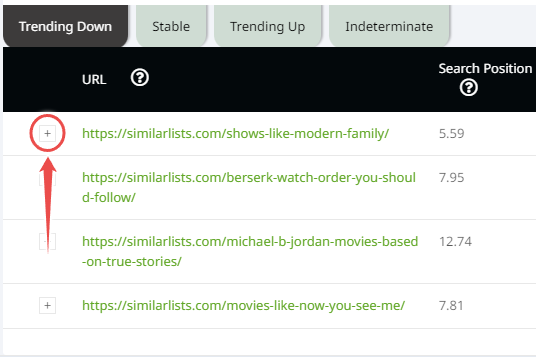
Clicking on the “+” sign opens up two dropdown lists. The first list shows all the keywords that the article ranks for and which have been losing traffic over the last month. These are the keywords publishers need to target to boost the article’s performance.
The second list shows the keywords that have gained the most traffic over the last month.
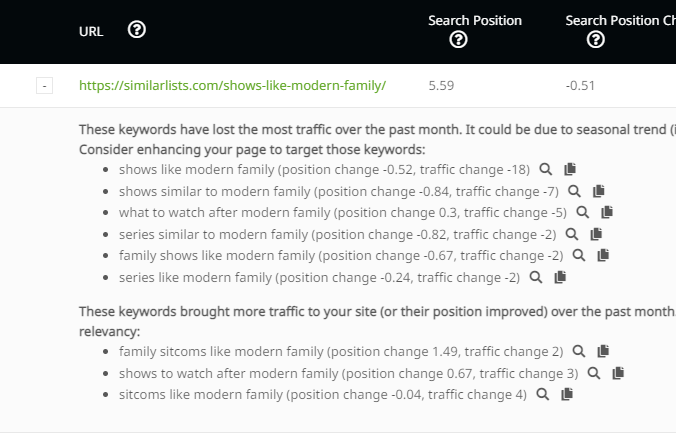
All-in-all, Page Booster has a pretty simple and straightforward interface, if lacking a little in gloss and aesthetics. But then, one must keep in mind that this is a highly functional tool, so form bows to function. The metrics and insights it makes available are rich enough not only to get the job done, but done well.
Page Booster in Review
Page Booster is a handy add-on to the already comprehensive NicheIQ keyword suggestion tool. Below we sum up all that we loved about it, and where we felt it could be improved further.
What We Love About Page Booster
- Provides actionable insights
- Provides a wealth of metrics
- Is easy to figure out
Where There’s Room for Improvement
- Traffic limits affect both small and large publishers
In the final analysis, we feel Page Booster does a good job of delivering on what it promises — help in boosting page performance.
It has some obvious limitations, of course. Smaller publishers or publishers just starting out, who either don’t receive much traffic or whose pages rank below 20 on search results, may not be able to derive much value from it. On the other hand, larger websites that need performance data for more than 100 pages may also find its utility somewhat limited.
Beyond these limitations, however, Page Booster has the potential to be an important tool in any publisher’s toolkit. Publishers can now focus on creating great new content, without constantly having to worry about how their old content is performing. In other words, Page Booster has the potential to save publishers a significant amount of time, effort and resources.