



The concept of micropayment isn’t new for publishers. Though many perceived it as a giant leap forward in the context of digital news, the initial experiments failed to gain momentum. Blende, a Dutch digital news platform, came up with a pay-per-article model, but it failed to resonate with the readers. Be it decision fatigue or fragmented payment experience, the entire process seemed like a hassle for the users.
On the other hand, the revenue options were limited for publishers as the adoption rates were low. Some also feared that the pay-per-article model might pull the readers away from the subscription model completely. Eventually, Blenle gave up the micropayment model, shifted to a subscription model, and was later acquired by Cafeyn in 2020.
This made publishers wary of micropayments. But recently, Google’s new Offerwall has been able to pioneer a unique approach. It allows readers to pay directly inside Google Ad Manager, eliminating all possible avenues of friction previously faced by readers. Supertab is the technology behind the system that enables readers to gain short-term access to content (for days, hours, or weeks). On the other hand, the small payments get accumulated into one bill later. Now, the question remains whether this streamlined approach can turn this idea of ‘micropayments 2.0 into a game-changing strategy for publishers.
What is Supertab?

Publishers worldwide face the conundrum of monetizing non-subscribers. While a vast majority of the audience visits the site and engages with the content casually, very few are willing to pay for a monthly subscription.
Keeping the needs of present-day customers in mind, Supertab has devised a middle ground that aims to reach the previously untapped group. Supertab is a micropayment platform that transforms casual users into paying customers without any long-term commitment through its pay-as-you-go model. It is a paywall gate that does not follow the conventional micropayment model of traditional tools, making the process of buying and selling digital content easy and seamless, and allowing users to engage with the services on their own terms.
Like a digital running tab, it enables readers to enjoy the content without paying for every tiny transaction upfront. They can ‘put it on a tab’ and only pay when the total reaches $5. Going beyond the constraints of the paywall it makes any price point accessible to customers and gradually transforms them into subscribers. Whether it is a SAAS or AI company, or a content creator, Supertab can work as a flexible monetization tool for various platforms. Besides redefining digital payment, Supertab also ventures into AI and agent monetization. In this review, we will focus on the special features that particularly add value to the publishers and strengthen the monetization strategies..
Key Features of Supertab
The Tab Model
Instead of paying for each piece of content, users can take advantage of the payment aggregation model. They can keep enjoying the content across various websites and click on ‘put it on your tab system’. The charges get accumulated on the tabs. Users only have to pay $1 for the first tab, and then $5 once the payment reaches that threshold. With this micro-commitment approach, users are spared from repeated payment pop-ups, advertisements, and credit card barriers. They can pay later in the methods preferred by them, which improves the user experience and ensures customer retention.
Flexible payment models
Supertab has various monetization models that are suitable for various types of businesses and creators. It has a pay-as-you-go system that enables users to access content or services and only pay when the tab reaches its limit. This particularly interests and draws casual visitors who want to enjoy specific content that appeals to them without the pressure of subscriptions. There are time passes available which allow the users to enjoy exclusive access to a particular type of content (for a day or the weekend). Supertab has also introduced recurring subscriptions, or ‘subscription light,’ which users can cancel or pause according to their convenience. Besides, it also offers the facility of one-off purchases, which serves as the perfect option for special editions or educational courses.
The microtranscational model of Supertab helped The Deepak Chopra.ai team strike the right chord. The team wanted to earn substantial revenue by monetizing their content without pushing the users to sign up for expensive subscriptions. The time-passing option of Supertab helped the masses access little chunks of content without signing up for long-term subscriptions. The microtransaction starting at just $0.50 seemed viable. The charges would be added to the tab. The users would enjoy the content and would only have to pay after the amount reached $1. They could also opt for a 30-minute session and choose the option to pay later. With this approach, the platform saw 4 times more paying customers, a 19% growth in paying customers, and experienced an 18% surge in new users.
Integration with Google Ad Manager

Supertab can connect directly with Google Ad Manager’s Offerwall. It works like a pre-designed toolbox that a publisher can embed in their existing system without the help of developers or designing a customized payment solution. The integration process is straightforward and hassle-free. It allows users to log in directly and place various options, such as time passes or ‘put it on my tab’, in the same Google interface. This feature allows publishers to add micropayment as an option without disrupting the ad management system.
Multi-currency Support
Publishers often lose out on readers due to currency barriers. Designed to support more than 134 currencies, Supertab eliminates the friction related to international payments. Regardless of where the users are located or the currency they choose to pay in, Supertab converts and clears the transactions. This ensures that publishers can handle all backend operations with ease, making the concept of micropayments viable for a global audience.
Creating an account on Supertab
Creating an account on Supertab is a simple, seamless process that won’t take more than two to ten minutes.
- Visit the website (https://business.supertab.co) or log in using your social media account.
- You will receive an option to verify your email.
- Once you click on it, you are all set to create your own site or services in test mode. Before going live, this is the perfect way to verify your integration with the tool, but you will not be able to receive real payments in this mode.
- If you want to share access to your account with new administrators, go to the Team section, click “Add User,” and fill in their email address.
- Once the new administrators click on the link, they will be ready to collaborate. Until the new administrators receive the invitation to collaborate, they will be listed as pending.
- After the integration is complete, it is essential to fill in the KYC details. Click on ‘Finish setting up your account’ and enter the account details of your bank through the payment partner- Stripe.
7. Make sure to finish the verification process on the landing page of Stripe. Once the verification process is complete, you will be able to receive payments monthly.
8. The users can keep a tab on the payments through the dashboard.
Integrating your Supertab account with Google Ad Manager
- Go to the Google Ad Manager account and click on privacy and messaging.
- Click on ‘create Offerwall’ to create the new model pay-as-you-go and design the first message for the site visitors.
- Activate the Supertab option from the ‘User choices’ and Micropayments and Subscriptions option. It is an important step as it connects the payment system and Google Ad Manager.
- You will be redirected to the setup screen of Supertab. Click “Continue with Google” and use the same account you used for Google Ad Manager to sign in.
- Add all the essential information, such as business name and country, and then click ‘Continue’. Supertab is ready to be active.
- After your account is linked to the payment option, you can return to Google Ad Manager. You can now see a new payment option saying, “Put it on my tab” with a specific price point. You can choose to enable or disable this feature.
- Select the website where you want the Offerwall message to be visible. Click on ‘Publish’ to make the new pay-as-you-go model operational for the users.
- Select the specific websites where you want to show this new Offerwall message. Finally, click on “Publish” to make the new pay-as-you-go option live for their audience.
Supertab Experiences
After the process of account setup, integration and creating the first Offerwall, the next step would be regulating Supertab Experiences. This step is crucial, as it significantly impacts how the audience engages with and accesses the micropayment system.
1. Basic Paygate
Through the Basic Paygate, publishers can allow the platform to manage access to their content. It is the perfect choice for publishers who want to avoid technical work. After implementation, the content is blocked until the reader logs in from an existing account or makes a purchase. It prompts users to unlock content and buy access immediately by displaying subscription and time pass offers. This is the easiest way of integrating Supertab as it allows the publishers to monetize their content without heavy customization.
2. Purchase Button
If the publishers are looking for more flexibility, the Purchase Button is for them. Instead of blocking the content right away, publishers can determine where they want to display the purchase option to users (after a preview of an article or within special features). After readers complete the purchase, the results are displayed on the website, and the content is unlocked instantly. It is the perfect option for publishers who want a softer paywall that enhances the user driven experiences.
Customization Features
1. Offerwall Layout
Supertab gives publishers the flexibility to decide how the Offerwall appears to visitors and experiment with styles, such as carousels, lists, or grids. They can also adjust the fonts, colours, and buttons to align with the website’s branding. Apart from this, they can also decide on which page the Offerwall will be visible (homepage, article page, or other pages).
2. User Experience
The experience customization feature helps publishers personalize the user interactions with the micropayment system. While the Basic Paygate offers the option to choose between subscription and timepass options, the purchase button helps users decide when and where to display the purchase option. The experiences can also be customized according to various factors such as location, user behaviour, or subscription status.
3. Configuration Status
Publishers can also personalize the configuration to improve the user experience. From selecting the various types of offers, such as surveys, content unlocks, or app downloads, to setting the reward of the offers, segmenting the audience, or adjusting the frequency cap, various types of customization options are available.
4. Messaging and Text Customization
Every form of written communication, such as button text, labels, CTA title, and promotional conten,t can be cutomized to make sure everything is aligned with the brand voice. The language of the messages can also be customized to appeal to the global audience.
5. Analytics and Feedback Display
Supertab also allows publishers to customize dashboard metrics to keep a tab on performance, regulate offers or rewards based on real-time insights on user feedback. Based on user behaviour, the publishers can also refine their strategy and adjust their offers or placement of offers.
Getting started with Supertab Dashboard
Supertab’s dashboard provides detailed insights into customer overview, recent purchases, and the number of open tabs for each customer in one place. The well-organized dashboard will help users keep track of the purchasing trends and offer a glimpse of customer journeys in detail.
Various filters and aggregation tools help publishers customize data according to their needs. The aggregation filter enables you to check the necessary metrics based on hours, daily, monthly, quarterly, and yearly. The data range provides options to view the metrics based on the current week, the previous week, the past 180 days, or the past year. The users can reset or apply filters to keep track of the latest data.
1. Customer Insights

The detailed customer report offers you a 360-degree view of the audience behaviour and analyze how well they are engaging with your content through Supertab. Apart from viewing the number of users, you can track your user base and their interests. You will form a strong understanding of journeys, the patterns of purchase, the number of items accessed and purchased per user, and the demographics.
2. Recent Purchases
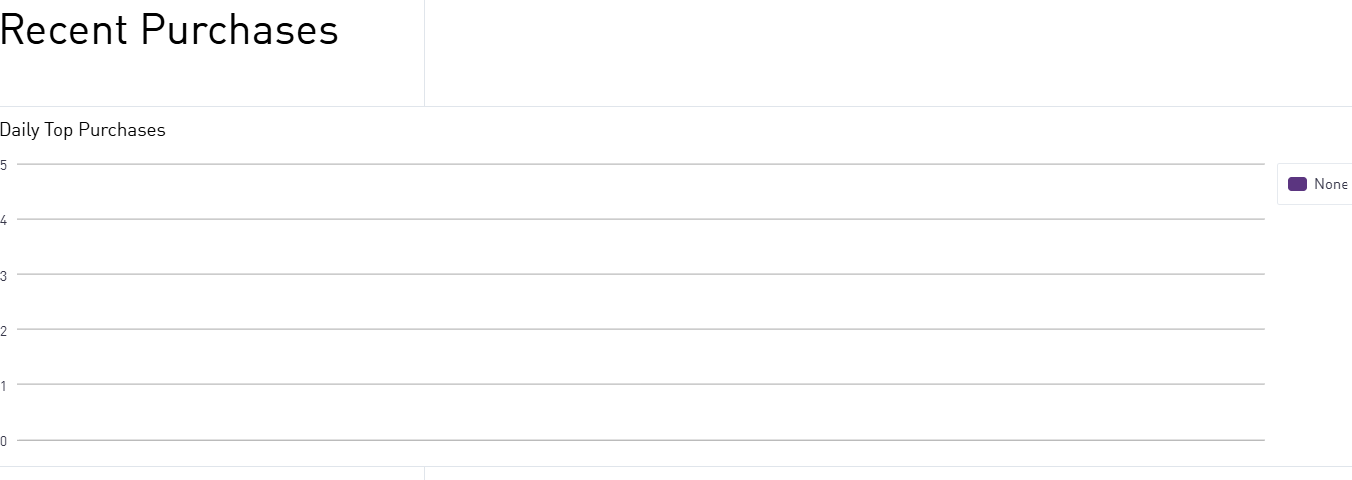
The recent purchases option provides a comprehensive view of what readers are purchasing in real-time. It sheds light on the top purchases, helps users identify the stories which are bringing in more conversions, and spot trends. By monitoring this section, publishers can identify what is working and what is not, and refine their editorial strategy accordingly. If you notice a dip in activity, it can help you take action so that you don’t miss out on the revenue opportunity.
3. Purchase History

This works like a payment logbook, offering a detailed overview of page title, customers, date, products, order status, and payment status. Publishers can also see whether users have chosen a time pass or a subscription, supervise transactions in detail, and verify that all payments have been made. The publishers can also search, filter, and export this important data as a CSV file to use in their own analytics.
4. Payout Tracker
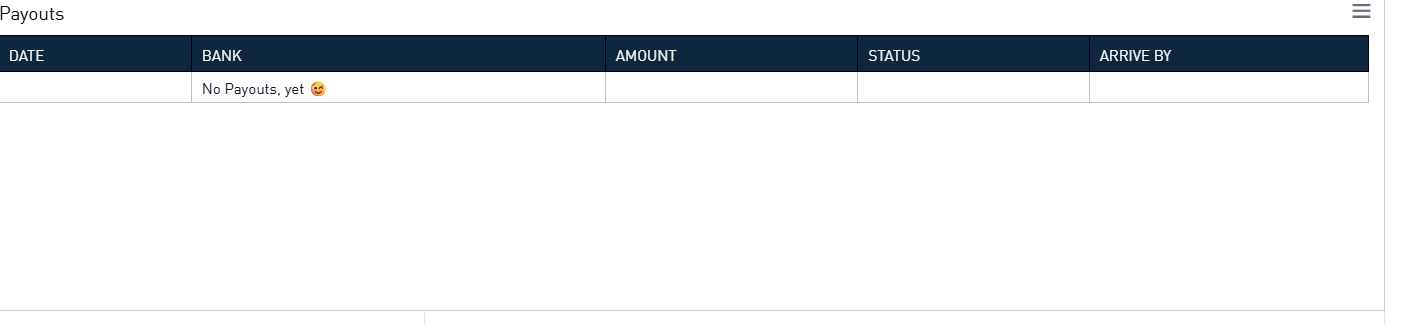
Beyond engagement rates and purchase history, this section enables publishers to monitor how revenue flows back to their account. It allows usersto closely monitor the name of the bank, the payment details, and the estimated time of payment arrival. This acts as a verifiable record for payments, providing financial clarity to publishers.
5. Open Tabs

The dashboard can help you monitor the number of open tabs and their values. It also consists of a key metric, The Daily Tab Closure, that allows the publishers to check how fast the tabs are being closed and payments are being made.
For example, if consumers open tabs but do not close them, it indicates that they are delaying payments. The publishers get clarity on user behaviour and tweak credit limits or encourage them to pay accordingly.
The Offerings page

The Offerings page helps publishers set up offerings (single items, time passes, and subscriptions), access, and prices according to their business needs. Every offering is associated with the name of the publication, along with a URL link and logo, to establish a strong brand identity in the minds of customers. This page is important as after entering the offering, these can be utilized in Paygate or the Purchase button.
The Experiences Page
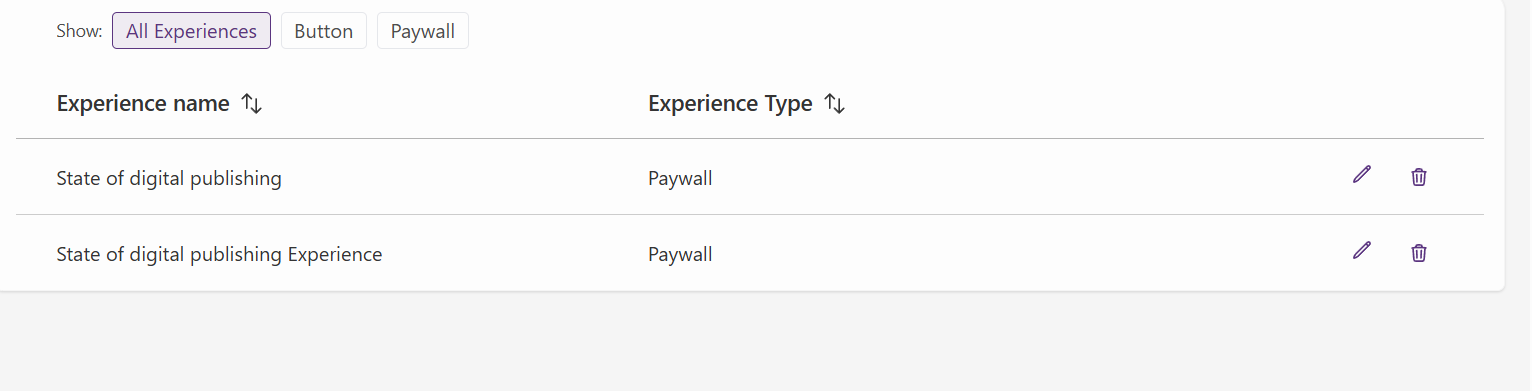
The Experience page of Supertab helps publishers determine how they want to exhibit the offerings to customers and determine where the readers encounter monetization prompts. Here, you can choose the basic paygate or purchase button, customize the text, colour of the paygate, and even the title of the paygate.
Pricing
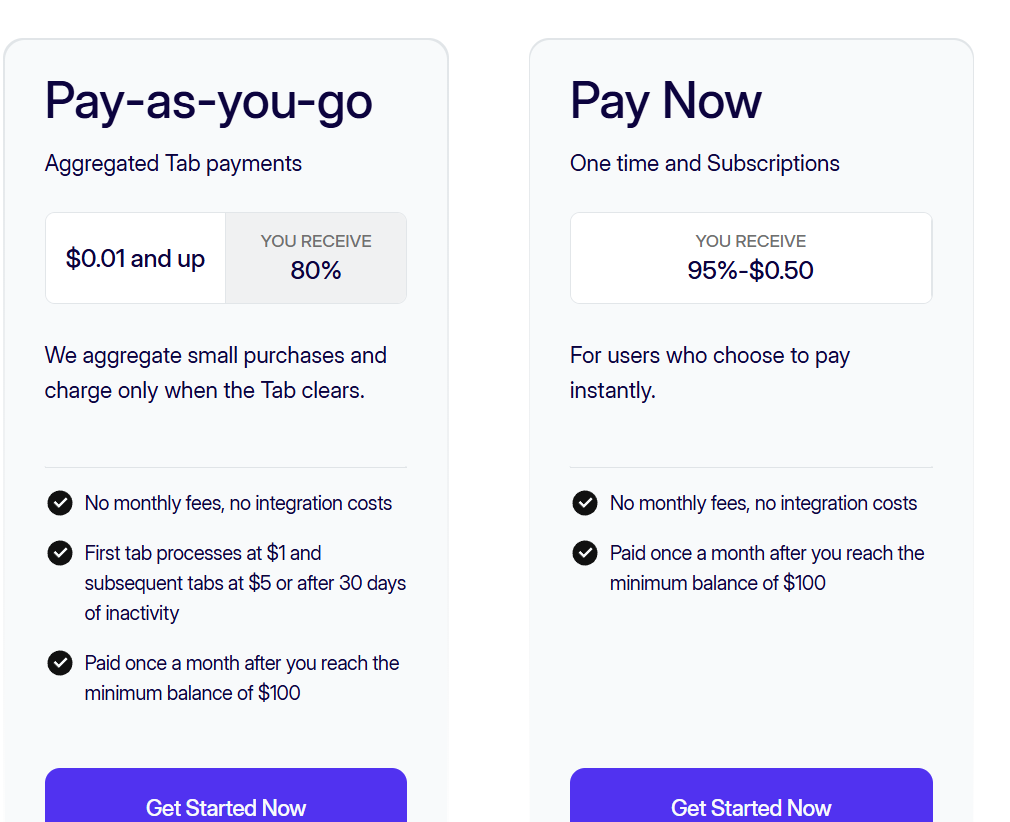
Supertab is widely recognised for its innovative aggregation model, which enables microtransactions on various websites without any hidden fees. It makes the smallest transaction affordable to users. There are two definite models which users can avail.
Pay-as-you-go model
This allows the users to make microtransactions. The payments are added to a tab, and the users only have to pay when the amount reaches $1 for the first tab, $5 for the subsequent tab, or if there is no activity for a month. The publishers get around 80% of the total amount, while the remaining 20% is considered the service fee of Supertab. However, the payments can only be received when the amount reaches at least $100.
Pay-Now model
This is an upfront option where users must pay for subscriptions or specific objects. Under this model, when the customers pay the amount, publishers receive 95% of the payment with a deduction of $0.50 for each transaction.
Personalized Pricing
Various businesses have various unique needs. Supertab offers customised packages for companies with high-volume traffic, a wide range of locations, or specific business strategies and objectives.
Support
The Supertab team understands the challenges users face and provides the highest level of support. The Supertab support team is here to assist users every step of the way, whether it’s during onboarding, troubleshooting issues, or resolving tech-related queries. From linking Google Ad Manager to setting up payment gateways, the support team understands your needs, listens to your problems, answers all your queries with patience, and helps you overcome the technical challenges that you may face along the way. The clear documentation ensures that no customer question goes unanswered.
Instead of following a one-size-fits-all approach, it understands the unique goals of publishers and businesses, and offers them tailored advice to support their growth accordingly. The collaborative approach of the support team makes the entire process seamless for the users.
Balancing monetization with user experience
Users do not necessarily require a high level of technical expertise to set up Supertab. Keeping the various capacities of the users in mind, Supertab has three designed pathways that are aligned with multiple levels of technical knowledge and flexibility. Whether you’re a solo creator, a leading publisher, or a close-knit team, the three distinct setup options make the entire experience seamless and straightforward for all.
Integration with Google Ad Manager- No-code solution
The concept of integrating a Supertab account with Google Ad Manager is seamless, especially for the website owners and publishers who are well-versed with the intricacies of Google Ad Manager for displaying ads. You can simply activate the feature within the Google Ad Manager 0account. Within a few steps, you can set up time passes, price points, and launch an Offerwall. This no-code solution is particularly user-friendly for publishers who prefer a straightforward approach.
Supertab Experiences-Low-code solution
This low-code option offers more flexibility to publishers who are comfortable with a little coding. All you have to do is create your site from the business portal and configure your offerings. Then you can set up ‘Experiences’ and choose either the basic paygate or purchase button. Copy the snippet code generated by Supertab and paste it on your page. Make sure you test it before going live. The pre-built solution helps the publishers customize certain aspects like the interface of payment options, tone of payment prompts, and design of pop-up options to suit their business needs. It gives more freedom to the publishers in determining how users experience Supertab and offers more options for customizatiom.
SDK/API Integration – Full custom
This is perfect for teams with robust development sources. Add Supertab.js (Browser SDK) to your app or website. This helps you design a purchase system that is aligned with your platform, rather than adhering to a fixed template. It also enables you to customize a unique user interface, connect it with CMS, and even set specific business guidelines, such as locking content after providing a number of free reads to the readers or providing custom rewards. The REST API provides an additional layer of security and detailed reporting, helping you enhance performance.
Supertab in Review
Here is what we loved about Supertab
- Supertab offers users the freedom to consume content in their preferred way, without forcing them into direct subscriptions. They can pay for a single session, opt for timed content, or explore the content thoroughly before deciding to subscribe.
- The aggregation model makes the micropayment affordable for merchants through the tab system, unlike traditional tools.
- Users do not need to store a balance in prepaid wallets. The frictionless model processes the payment through standard methods and aggregates them.
- Supertab operates across platforms, offering various avenues of monetization to the publishers.
- The integration pathways are varied and are perfect for teams with various levels of technical expertise. Integrating with Google Ad Manager is particularly easy as it does not demand coding expertise.
- Not just publishers, it can have a wide range of user cases, including Gen AI, developers, content creators, SAAS platforms, and more.
- Though it operates on a tab model, it prioritizes the privacy of users.
- The merchant of record service handles chargebacks, tax obligations, PCI compliance, and financial management on behalf of publishers.
- The revenue share model ensures that the publishers don’t have to pay upfront costs or licensing fees.
Here are the areas of improvement
- The Offer Wall monetization is highly dependent on Google Ad Manager. Publishers without a robust GAM setup might find this challenging.
- The setup process does not involve plug-and-play solutions. Publishers will need to configure ad units to enable the features of the Offer Wall to be operational.
- The Offer Wall functions similarly to online ads, as it relies on the Google Publisher Tag. This means that the users with ad blockers activated might not be able to see the Offer Wall.
- Publishers can opt for the button-only option instead of the Offer Wall, reducing the possibilities of customization.
- Since no consent has been obtained for email marketing, publishers must maintain compliance with the GDPR and CCPA.
Final Thoughts
Supertab has been able to address the gap between free access and long-term subscriptions. Through its tab-based model, it has added a flexible approach to micropayments. We recommend this paywall gate for its user-first and friction-free approach, flexible integration options, and pay-as-you-go experience. It opens new avenues of monetization for publishers while making premium content affordable for users. You can start with the no-code option, test its performance, and then move on to the SDK model if it suits your purpose. Larger publications can also integrate with existing larger solutions, such as Piano, for an additional modular experience. Supertab offers a compelling solution for small to mid-sized publishers who want to attract users with a frictionless aggregation model, demonstrating how micropayments can work hand-in-hand with subscriptions as a future-ready revenue stream for publishers.